EasyManua.ls Logo

August WR320 - User Manual

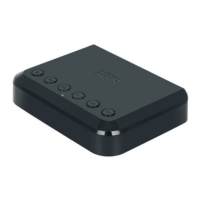
August WR320
13 pages
Print Icon
To Next Page IconTo Next Page
Loading...
August International Ltd
United Kingdom
Tel: +44 (0)845 250 0586
www.augustint.com
WR3
20
Wi-Fi Wireless Multiroom Receiver
EN
Récepteur Wi-Fi Multiroom Sans-Fil
Schnurloser Wi-Fi Multiroom Empfänger
Ricevitore Wi-Fi Multiroom Senza Fili
Receptor WiFi Multiroom Inalámbrico
FR
DE
IT
ES
Question and Answer IconNeed help?

Do you have a question about the August WR320 and is the answer not in the manual?

Summary

Safety Instructions

Storage and Use Guidelines

Guidelines for storing and using the device to prevent damage and ensure safety.

Maintenance and Cleaning

Instructions for cleaning the device and its components safely.

Main Features

Audio System Connectivity

Enables adding multiroom capability to any home audio system via Wi-Fi.

Connectivity Options

Supports Bluetooth, Ethernet, Wi-Fi, Optical, and 3.5mm audio outputs.

Box Contents

Included Accessories

Lists all items included in the product packaging, such as receiver and cables.

Part Names and Functions

Device Top Panel Overview

Identifies buttons and switches on the top of the WR320 device.

Device Back Panel Overview

Identifies ports and connectors on the back of the WR320 device.

Status LED Indicator Meanings

Explains the different states and colors of the status LED on the device.

Quick Start Guide

App Installation and Device Setup

Steps to download and install the 'August Alink' app and connect the device.

Wi-Fi Connection Method

Instructions for connecting the WR320 to your Wi-Fi network.

Operation

Installation and Initial Setup

Guide to installing the WR320 and setting up the initial Wi-Fi connection.

Connection Methods

Details on connecting the WR320 via Aux, Optical, and USB ports.

Wi-Fi Network Setup

Steps for establishing a Wi-Fi connection using the app or WPS.

Wi-Fi Direct Connection

How to connect your device directly to the WR320's Wi-Fi network.

Bluetooth Connection Guide

Instructions for pairing and connecting Bluetooth source devices to the WR320.

Speaker Mode Configuration

Settings for Solo and Multiroom modes for synchronized audio playback.

Music Source Selection

Guide to selecting music from local files, online providers, or receiver options.

Local Music Playback

Steps to access and play music stored locally on your device.

Third Party Music Providers

Instructions for connecting and using online music streaming services.

Line-In Mode Operation

How to use the Line-In mode for audio playback from external sources.

Troubleshooting Common Issues

Device Power and Connectivity Problems

Solutions for issues like the device not switching on or Wi-Fi connection failures.

Bluetooth Pairing and Audio Issues

Resolving problems related to Bluetooth pairing and no sound output.

Technical Specifications

Performance Metrics

Details on SNR, distortion, frequency response, and Wi-Fi band.

Physical and Connectivity Details

Information on Wi-Fi range, Bluetooth version, power input, dimensions, and weight.

Product Warranty Information

Warranty Terms and Conditions

Explains the warranty period, coverage, exclusions, and conditions for claims.

Customer Service Contact

Provides contact details for obtaining technical support or customer service.

Summary

Safety Instructions

Storage and Use Guidelines

Guidelines for storing and using the device to prevent damage and ensure safety.

Maintenance and Cleaning

Instructions for cleaning the device and its components safely.

Main Features

Audio System Connectivity

Enables adding multiroom capability to any home audio system via Wi-Fi.

Connectivity Options

Supports Bluetooth, Ethernet, Wi-Fi, Optical, and 3.5mm audio outputs.

Box Contents

Included Accessories

Lists all items included in the product packaging, such as receiver and cables.

Part Names and Functions

Device Top Panel Overview

Identifies buttons and switches on the top of the WR320 device.

Device Back Panel Overview

Identifies ports and connectors on the back of the WR320 device.

Status LED Indicator Meanings

Explains the different states and colors of the status LED on the device.

Quick Start Guide

App Installation and Device Setup

Steps to download and install the 'August Alink' app and connect the device.

Wi-Fi Connection Method

Instructions for connecting the WR320 to your Wi-Fi network.

Operation

Installation and Initial Setup

Guide to installing the WR320 and setting up the initial Wi-Fi connection.

Connection Methods

Details on connecting the WR320 via Aux, Optical, and USB ports.

Wi-Fi Network Setup

Steps for establishing a Wi-Fi connection using the app or WPS.

Wi-Fi Direct Connection

How to connect your device directly to the WR320's Wi-Fi network.

Bluetooth Connection Guide

Instructions for pairing and connecting Bluetooth source devices to the WR320.

Speaker Mode Configuration

Settings for Solo and Multiroom modes for synchronized audio playback.

Music Source Selection

Guide to selecting music from local files, online providers, or receiver options.

Local Music Playback

Steps to access and play music stored locally on your device.

Third Party Music Providers

Instructions for connecting and using online music streaming services.

Line-In Mode Operation

How to use the Line-In mode for audio playback from external sources.

Troubleshooting Common Issues

Device Power and Connectivity Problems

Solutions for issues like the device not switching on or Wi-Fi connection failures.

Bluetooth Pairing and Audio Issues

Resolving problems related to Bluetooth pairing and no sound output.

Technical Specifications

Performance Metrics

Details on SNR, distortion, frequency response, and Wi-Fi band.

Physical and Connectivity Details

Information on Wi-Fi range, Bluetooth version, power input, dimensions, and weight.

Product Warranty Information

Warranty Terms and Conditions

Explains the warranty period, coverage, exclusions, and conditions for claims.

Customer Service Contact

Provides contact details for obtaining technical support or customer service.

August WR320 Specifications

General IconGeneral
MultiroomYes
BluetoothYes
EthernetYes
USBUSB 2.0
Streaming ServicesSpotify, Tidal, Qobuz

Related product manuals