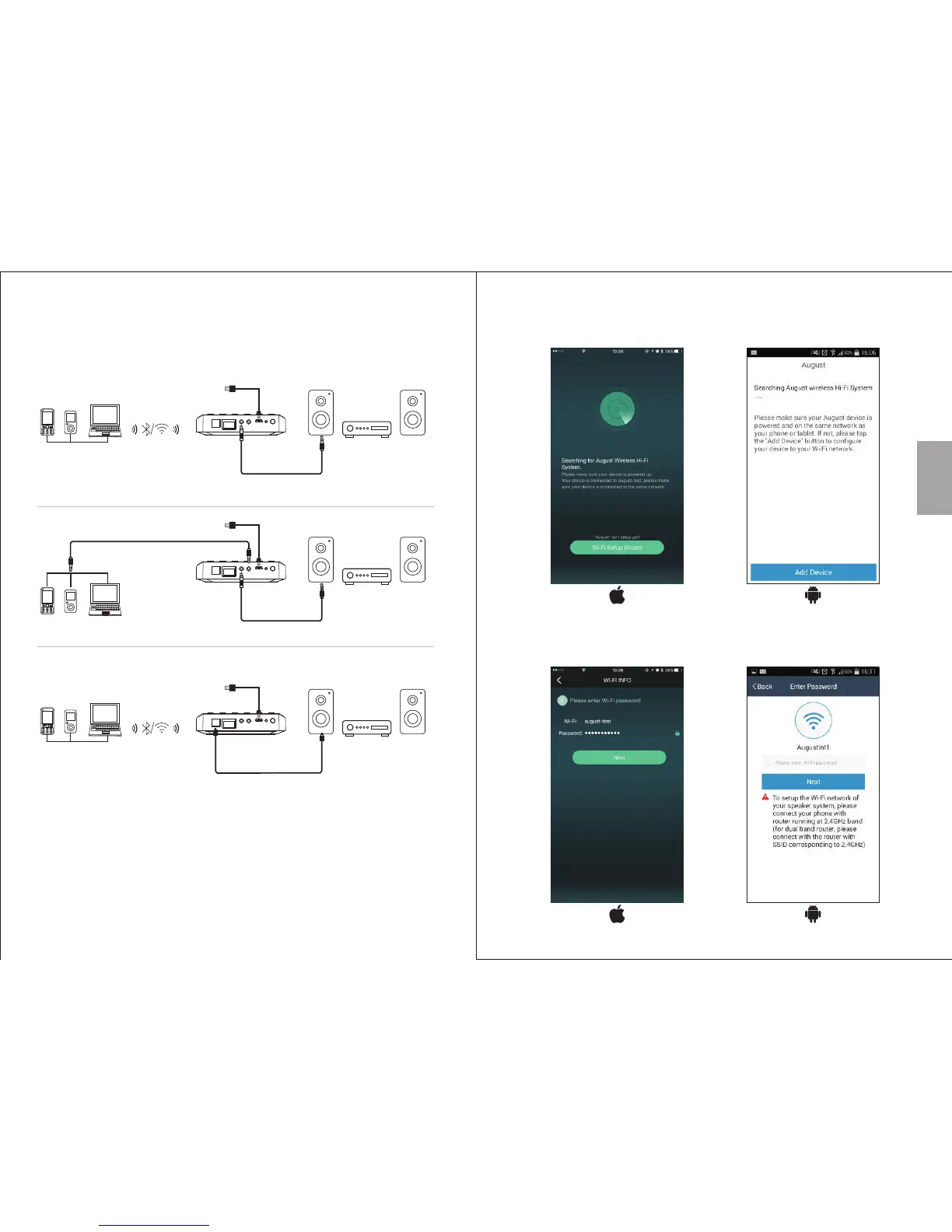
5.2 Connection
5.3 Wi-Fi Connection
5.3.1 Network Connection
English
-8-
-7-
Optical connection
3.5mm Audio Cable
Aux connection
AUX INLANOPTICAL AUX OUT WPSDC 5V
Reset
Power Cable
Optical Audio Cable
AUX INLANOPTICAL AUX OUT WPSDC 5V
Reset
Power Cable
1. Connect the power cable to the micro USB Power Port.
2. Connect the WR320 to the AUX-In socket of your playback
device using either a 3.5mm or optical cable.
2. Confirm you Wi-Fi network’s name and enter the password,
then press ‘Next’
1. Run the application and press ‘Wi-Fi Setup Wizard/Add Device’
Aux Out
3.5mm Audio Cable
AUX INLANOPTICAL AUX OUT WPSDC 5V
Reset
Power Cable
Aux In
3.5mm Audio Cable


 To Next Page