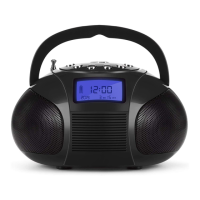
Thank you for purchasing the August SE20 Bluetooth Boombox with
FM Radio. This user manual is designed to familiarize you with all the
features of this device. Please take the time to read this user manual
carefully, even if you are already familiar with a similar product.
Safety
To ensure the safety of you and others, please read the Safety
Instructions before using this device.
Please do not disassemble the SE20, it can be unsafe and will
invalidate the manufacturer's warranty.
Disposal
Please ensure the product and accessories are disposed of in
compliance with the WEEE (Waste Electrical and Electronic
Equipment) Directive and any other regulations applicable to your
country. Always check with the environment agency and any other
relevant authorities for current disposal regulations.
Customer Service:
You can contact us by phone on: +44 (0)845 250 0586 or by email at:
service@augustint.com should you require further technical support
or customer service.
User Manual
English
1.
2.
Quick Start Guide
SE20
Before using for the first time, please ensure that the device is fully
charged. Connect the mini USB lead the power socket and the other
end of the USB cable to a powered USB port, and charge for 3 hours.
Set the time. Switch the unit on and press the M button to switch to clock
mode indicated by the clock symbol in the top of the display, and the
display dimming.Press to select Year/Month/Day/Hour/Minute in
turn and adjust by pressing . Press V- to switch between
12/24 hours.
Bluetooth. Press the M button until the display says "BLUE" and a short
beep is heard. Scan for Bluetooth devices on your device and select
"SE20". Press, or press and hold the or buttons to
change the volume up or down.
USB and SD card. When a USB device or SD card is inserted the SE20
will start playing MP3 format music from the USB or SD card.
Press button to change the track, or press and hold to
fast forward or back through the current track. Press, or press and hold
the buttons to change the volume up or down.
FM Radio Search. Press the M button until the display shows the FM
icon and frequency in MHz. To scan and search for the next higher or
lower FM radio channel, press and hold either the
button. To scan and save all available FM radio channels automatically,
press the button. After searching, you can select the saved channels
by pressing the buttons which are shown as P01, P02
etc.
“ ”
“ ” or “ ”
“ ” or “ ”
“ ” or “ ”
“ ” or “ ”
“ ” or “ ”
“ ”
“ ” and “ ”
V+ V-
V+ V-
Aux in. Connect the 3.5mm plug to the earphone socket of the external
multimedia device and the mini USB to the SE20. Press the M button to
change the mode until the display shows "AUX".
For any other queries, please telephone August International Ltd. helpline
+44 (0) 845 250 0586, or email service@augustint.com
3.
4.
5.
6.
7.


 To Next Page
 Loading...