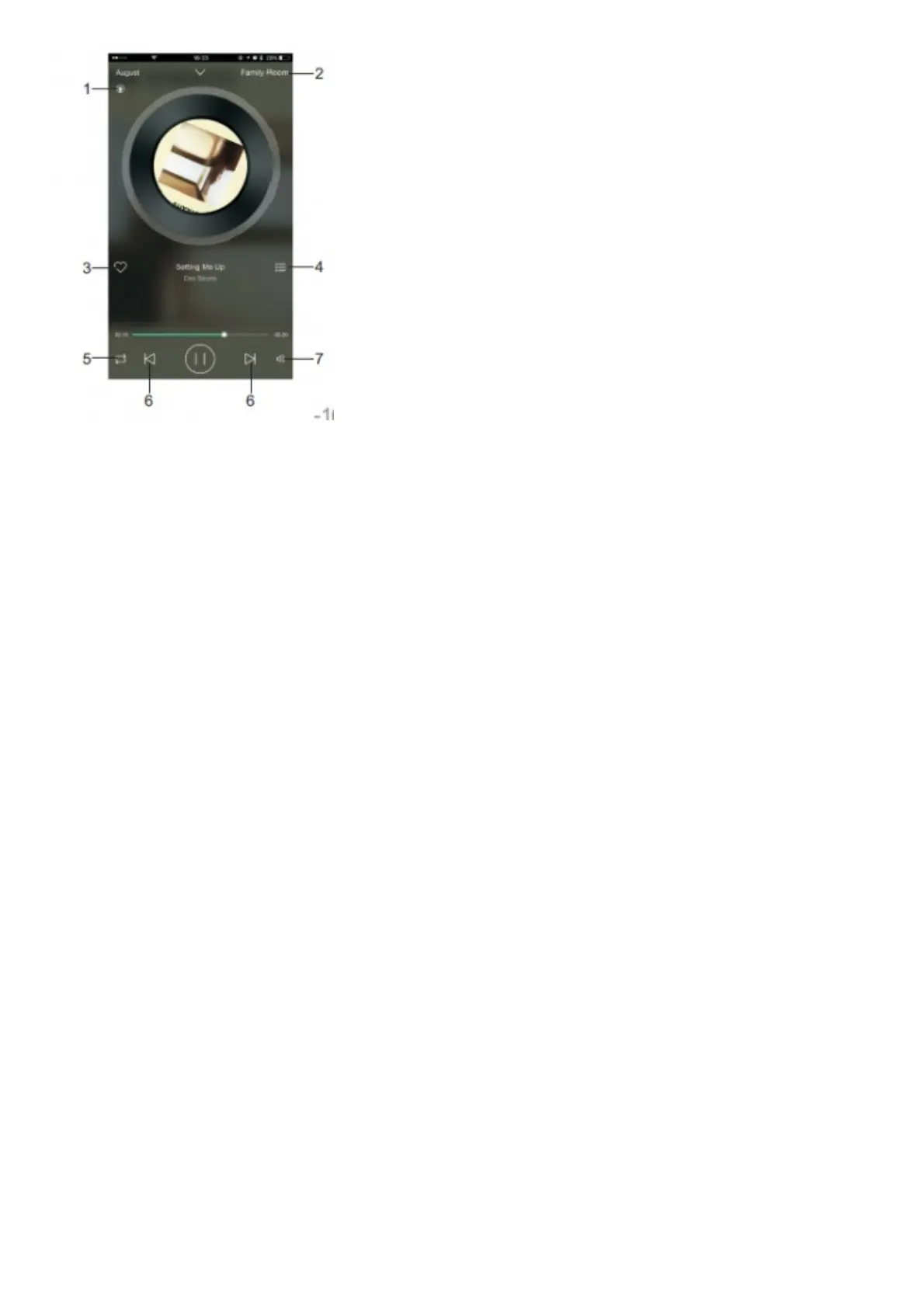
1. Current music source
2. Current speaker
3. Press to add to the favourites / remove from the favourites
4. Press to see the current playlist
5. Repeat and Shuffle option
6. Track controls
7. Volume control
5.6 Hands-free Calling (Bluetooth Connection Only)
When connected through Bluetooth to a mobile phone, the WS150 / 300 will act as a hands-free system for any calls.
The music will be stopped for any incoming calls,
and will resume once the call finished. – Press to answer an incoming call or to end an ongoing call.
– Press and hold to reject an incoming call.
– When playing music, press and hold to dial the last number from your call directory.
– Use + or – to adjust the call volume.
5.7. Audio-In
Use the provided audio cable to connect your source device to the speaker. Once the audio cable is plugged in, the
speaker will enter the audio-In mode automatically.
6. Charging
Connect the speaker to a powered USB port using the provided USB power cable. While charging, will light red and
go off once the battery is fully charged.
A full charge takes approximatively 7 hours depending on power input.
7. Troubleshooting



 To Next Page