50
EN
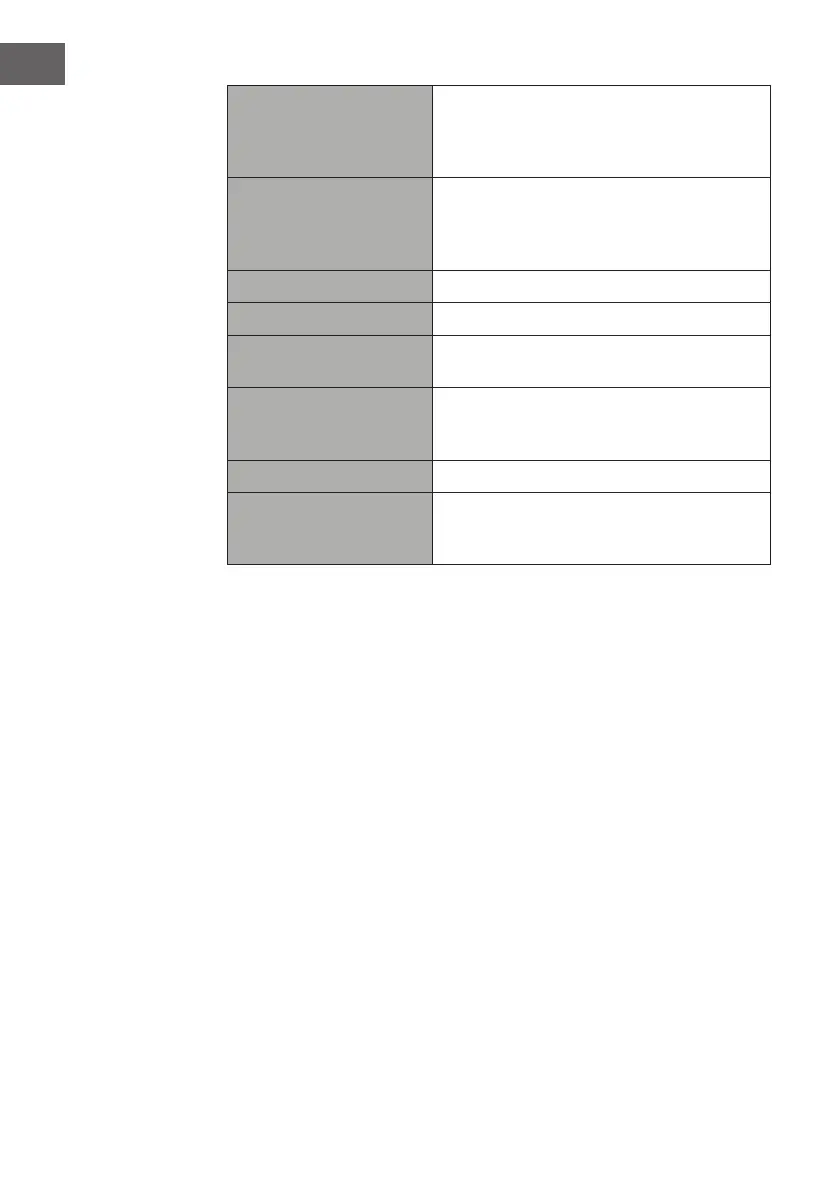
Network wizard
SSID – select the desire wireless network.
Rescan – Scan for available networks.
Manual cong – select wireless network
with DHCP enable/disable.
PBC Wlan setup
Select WPS on the unit and press the WPS
button on the modem device that you
wish to connect with. Press the ENTER
button to continue.
View settings Display the setting on the unit.
Wlan region Select a country of your choice.
Manual settings
Select wireless network with DHCP enable/
disable.
NetRemote PIN Setup
Allows you to dene a PIN number to be
entered before being able to connect the
device remotely over a network.
Network prole View the connected network..
Keep network connected
Allows you to dene whether the device
remains connected to its network in Standby
mode and when not in Network radio mode.
3. Press the BACK button on the unit or on the remote control to cancel the
setting and return back to the previous menu.
Time/Date
The Time/Date can be automatically set once it has been connected to the
Internet, DAB+ or FM radio station with time/date information. You may
also adjust the Time/Date manually.
In System settings mode, press the / buttons to select Time/Date and
press the ENTER button to conrm. Press the / buttons to select Set Time/
Date and press the ENTER button to conrm.
1. The date digits will ash on the display.
2. Press the / buttons to adjust the day and then press the ENTER
button to conrm.
3. Repeat above Step (2) to set the Month/Year/Hour/Minute.
4. The date and time settings are now complete.
For the other settings under Time/Date, press the / buttons to select
from the following options and then press the ENTER button to conrm.


 To Next Page