43
EN
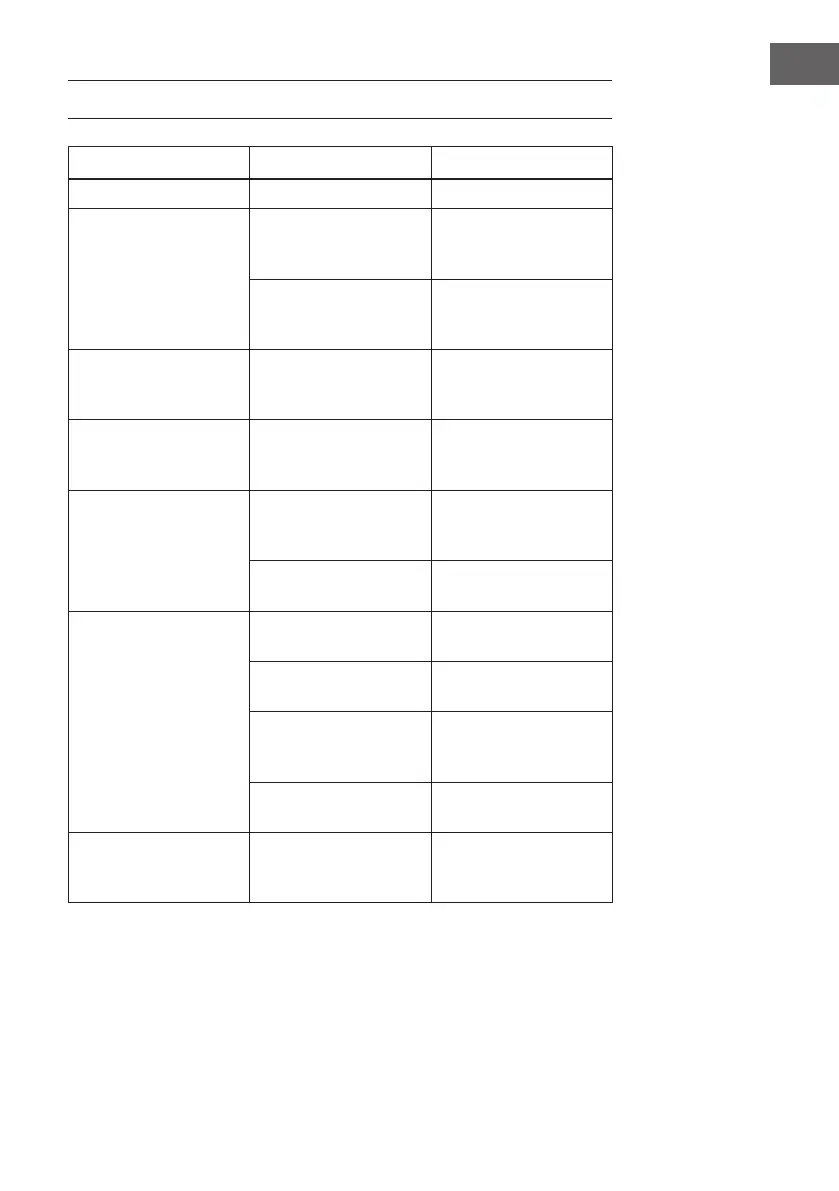
TROUBLESHOOTING
Symptom Possible Cause Possible Solution
Cannot power on. Built in battery drained. Recharge.
No sound or sound weak
Volume level in minimum
position.
Rise the volume level by
press the VOL + Button on
the top of unit.
Volume level of paired/
connected device
is in low level.
Rise the volume level of
the paired/connected
device.
Sounddistortion
Volume level too high Reduce the volume level
by press the VOL - Button
on the top of unit
Volume level of the
connected/paired
device too high
Reduce the volume level
of the connected/paired
device
BT not functioning
The external BT device
had NOT paired to the
unit
Pair the external BT
device to the
unit
The external BT device
too far from the unit.
Place the external BT
device close to the unit.
Wi-Fi not functioning
The unit had NOT add in
the Wi-Fi .network.
Add the unit into the Wi-Fi
network.
The unit not in Wi-Fi mode Power on the unit and
enter to the Wi-Fi mode.
The unit and the mobile
device is not in the same
2.4G Wi-Fi network
Set the unit and the
mobile device in the
same 2.4G Wi-Fi network.
The router was in power
o mode.
Power on your Wi-Fi
router.
Amazon Alexa not
functioning
The unit is not in the
Amazon Alexa operation
mode
Power on the unit and
enter to Amazon Alexa
operate mode.


 To Next Page