22
www.auna.de
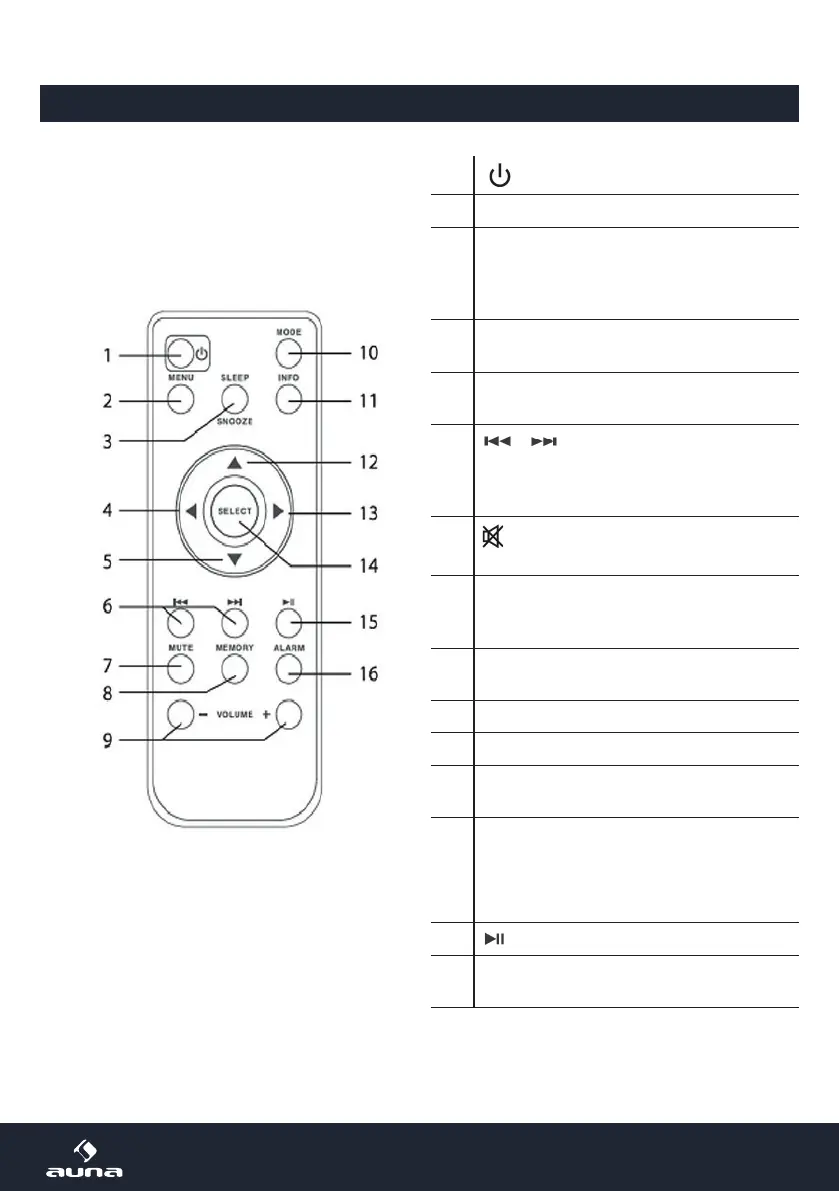
1
Power On/Standby
2 MENU
3
SLEEP/SNOOZE
Press repeatedly to activate and set the
sleep timer.
When the alarm rings, press for snooze.
4
LEFT
Navigate in lists and menues/back
5
DOWN
Navigate in lists and menues
6
/
Previous/next track
DAB: station list
FM: search band manually (0.05Mhz/step)
7
Mute/un-mute
8
MEMORY
Save station to presets (hold)
Show list of previously saved stations (press)
9
V+/-
Adjust volume
10 MODE
11 INFO
12
UP
Navigate in lists and menues
13
RIGHT
Navigate in lists and menues/open submenu
14
SELECT
Conrm highlighted option/value
15
: Play/pause / station scan
16
ALARM
Enter alarm settings
Overview: Remote Control



 To Next Page