EasyManua.ls Logo

auna KR-140 DAB - User Manual

auna KR-140 DAB
134 pages
Go to English
Print Icon
To Next Page IconTo Next Page
Loading...
www.auna-multimedia.com
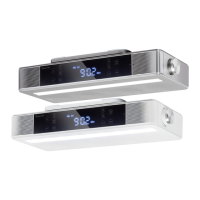
KR-140 DAB
DAB Küchenradio
DAB Kitchen Radio
Radio de cuisine DAB
Radio de cocina DAB
Radio da cucina DAB
10032851 10032852

Table of Contents

Questions and Answers

  • S
    Scott TrujilloAug 5, 2025
    Why is there no sound coming from my auna Radio?
    • K
      Karen MeyerAug 5, 2025
      If your auna Radio isn't producing any sound, here are a few things to check: * Ensure the volume isn't set too low on both the radio and your connected mobile device. * Verify you've selected the correct input source. * If using Bluetooth, confirm your device is within the radio's operational range. * Make sure your Bluetooth device is properly paired and shows as connected on your mobile device.
  • A
    Alexandra RossAug 12, 2025
    How to fix auna KR-140 DAB Radio when it has no power?
    • W
      watkinsjasonAug 12, 2025
      If your auna Radio isn't turning on, make sure the DC plug of the AC adapter is securely plugged into the DC jack on the main unit and that the AC adapter is firmly plugged into the AC outlet.
  • S
    Stephanie BakerAug 20, 2025
    What to do if my auna Radio is not picking up any radio stations?
    • D
      Destiny VasquezAug 20, 2025
      If your auna Radio isn't picking up any radio stations, check that the FM station is tuned to the correct frequency and programmed correctly.
  • M
    Miss Krista SextonAug 27, 2025
    How to restart the speaker on auna KR-140 DAB?
    • R
      Rebecca GrantAug 27, 2025
      If the speaker on your auna Radio isn't responding, try restarting it by turning the power off and then back on.

Summary

Safety Instructions

Getting Started

Aligning the Telescopic Antenna

Position and extend the telescopic antenna for optimal radio reception.

Power Connection and MODE Button

Connect the device to power and switch between operating modes.

System Settings

System Submenu

Access and navigate system options like time, backlight, and language.

Radio Mode

Manual Tune Station

Tune radio stations manually by frequency or step.

Save Manual Tuned Frequency into Preset

Store manually tuned radio stations into memory slots.

Auto Memory Stations (AMS)

Automatically scan and save available FM radio stations.

Preset Recall and Change Station

Recall and switch between stored radio stations by preset number.

FM Settings

Configure scan settings, audio options, and system links for FM radio.

DAB;DAB+ Mode

Start DAB Mode

Initial setup and scanning for DAB stations.

BT Mode

Set Alarm and Wake-up Function

Alarm Time Set

Configure alarm time, duration, source, schedule, and level.

Use Cooking Timer

Reset the Device

Install the Under Kitchen Mounting Bracket

Troubleshooting

No Power

Checks to perform if the device does not turn on.

No Sound

Steps to take if the device produces no audio output.

No Radio Station

Troubleshooting steps for not receiving radio signals.

No Response from Speaker

Resolving issues where the speaker is unresponsive.

auna KR-140 DAB Specifications

General IconGeneral
DisplayLCD
Presets20
BatteryNo
MountingTabletop
Headphone JackYes
TunerDAB+, FM
Frequency RangeFM: 87.5-108 MHz, DAB: 174-240 MHz
Connectivity3.5mm AUX-in
Power SupplyAC 100-240 V
Special featuresAlarm, Sleep Timer

Related product manuals