Need help?
Do you have a question about the AURES YUNO II and is the answer not in the manual?
Compliance details for FCC Class A digital device regulations.
States compliance with EMC and Low Voltage Directives.
References UL certification and safety standards.
Information on WEEE mark and proper disposal of electronic equipment.
Critical guidelines for safe operation and handling of the device.
Lists essential components included with the YUNO-II system.
Lists optional peripherals available for purchase with the YUNO-II system.
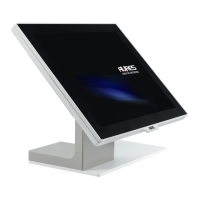
Illustrates and labels the front components of the YUNO-II system.
Details and labels the rear components of the YUNO-II system.
Shows and labels the side view and ports of the YUNO-II system.
Provides the physical dimensions of the YUNO-II 151 model.
Displays and labels the input/output ports for the YUNO-II system.
Details the specifications and options for the processor module.
Describes the layout, connectors, and functions of the I/O module.
Step-by-step guide to opening the system cover for access.
Instructions for installing memory and SSD for the processor module.
Procedures for connecting the 65W power adapter to the system.
Steps for mounting the YUNO-II system using a VESA bracket.
Guide on connecting and configuring the cash drawer.
Details on installing magnetic stripe readers and fingerprint scanners.
Instructions for attaching the customer display (LCM/2NDLCD).
 General
| Brand | AURES |
|---|---|
| Model | YUNO II |
| Category | Touch terminals |
| Language | English |

 To Next Page