- 22 -
Setting the time
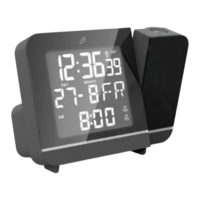
Press and hold the button. 24Hr or 12Hr flashes
on the display . Press the button or the
button to select the 12- or 24-hour time format. Confirm
your selection by pressing the button. Set the
following in the same way: hours, minutes, year, date
format (day (D)/month (M) or month (M)/day (D)), month
and day. You will exit the setting mode as soon as you
confirm your last selection. If the 12-hour time format has
been selected, PM will appear before the time in the
afternoon (12:00 - 23:59).
Alarm
Switch on the desired Alarm 1 or 2 with the respective
switch or switch . Setting the
alarm time is only possible when the alarm is switched on.
Press the button to select Alarm 1 or Alarm 2. The
selected alarm will appear in the display and the
alarm time will appear in the display.
Press and hold the button to set the selected alarm.
The hours flash on the display. Set the hours by
pressing the button or the button. Confirm
your setting by pressing the button. Set the minutes
in the same way. You will exit the setting mode as soon as
you confirm your last selection.


 To Next Page