11ENGLISH
CARE AND MAINTENANCE
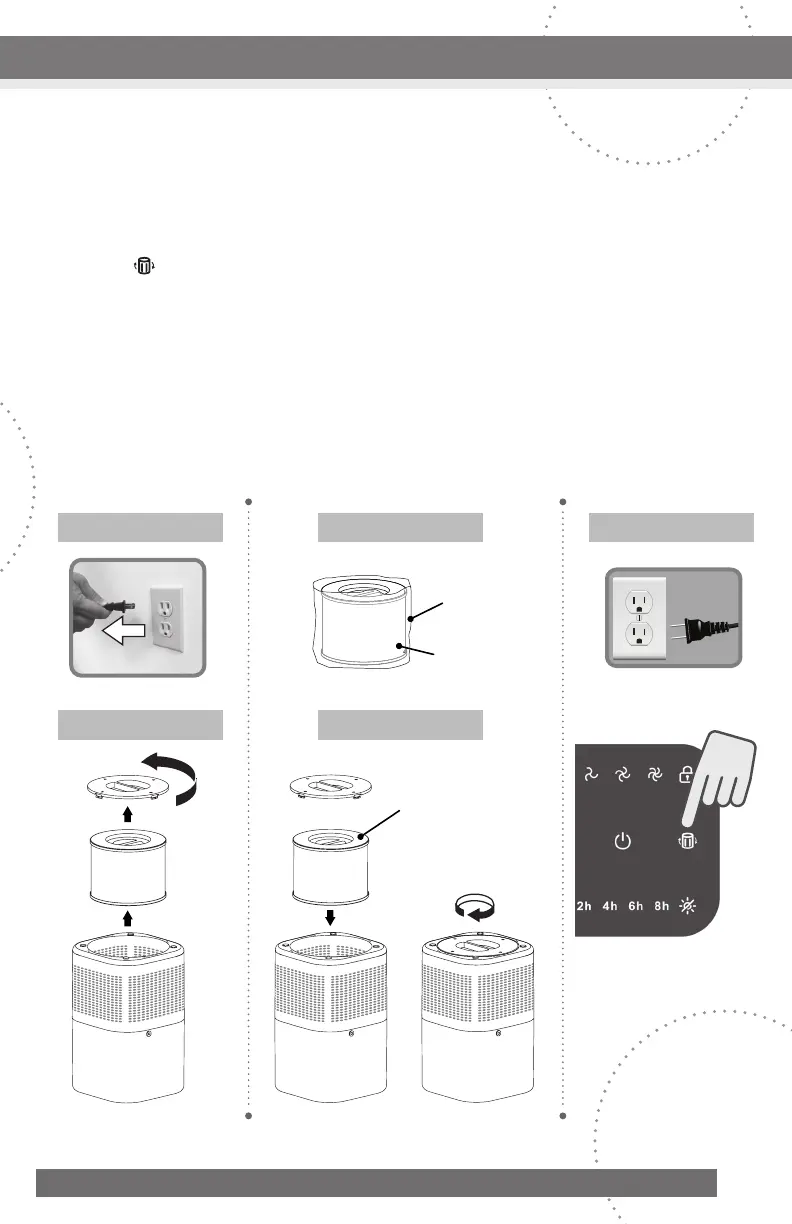
removetheoldcarbonfilterfromthepurifier.(FIGURE2)
3.Removetheplasticbagfromthenewfilter.(FIGURE3)
4.Placethenewfilterintothepurifierandclosethebottomcover.(FIGURE4)
5.Re-connectthepoweradaptertotheairpurifier’spowerportplugthepowercordinto
anystandard120-voltACwalloutletandturnontheunit.TaptheFilter Change
Indicatorandholdfor3secondstoresetthestatusafterthefilterisreplaced.(FIGURE5)
Caution:
•Removetheplasticbagfromthefilterbeforeuse.Operatingtheairpurifierwithoutfirst
removingtheplasticbagfromthefiltermayoverheatthemachineandcauseafire
hazard.
•Donotaddessentialoilstotheairpurifierorfilter.Thefilterwillbedamagedbytheoils.
•Donotuseoildiffusersneartheairpurifier.
Remove
plastic
bag
Filter
Handle
Facingup
Figure 2
Figure 1 Figure 3
Figure 4
Figure 5
CLOSE
OPEN
CLOSE
OPEN
CLOSE
OPEN
CLOSE
OPEN
CLOSE
OPEN
CLOSE
OPEN
CLOSE
OPEN
CLOSE
OPEN
CLOSE
OPEN
CLOSE
OPEN
CLOSE
OPEN
CLOSE
OPEN



 To Next Page