8 ENGLISH
INSTALLATION
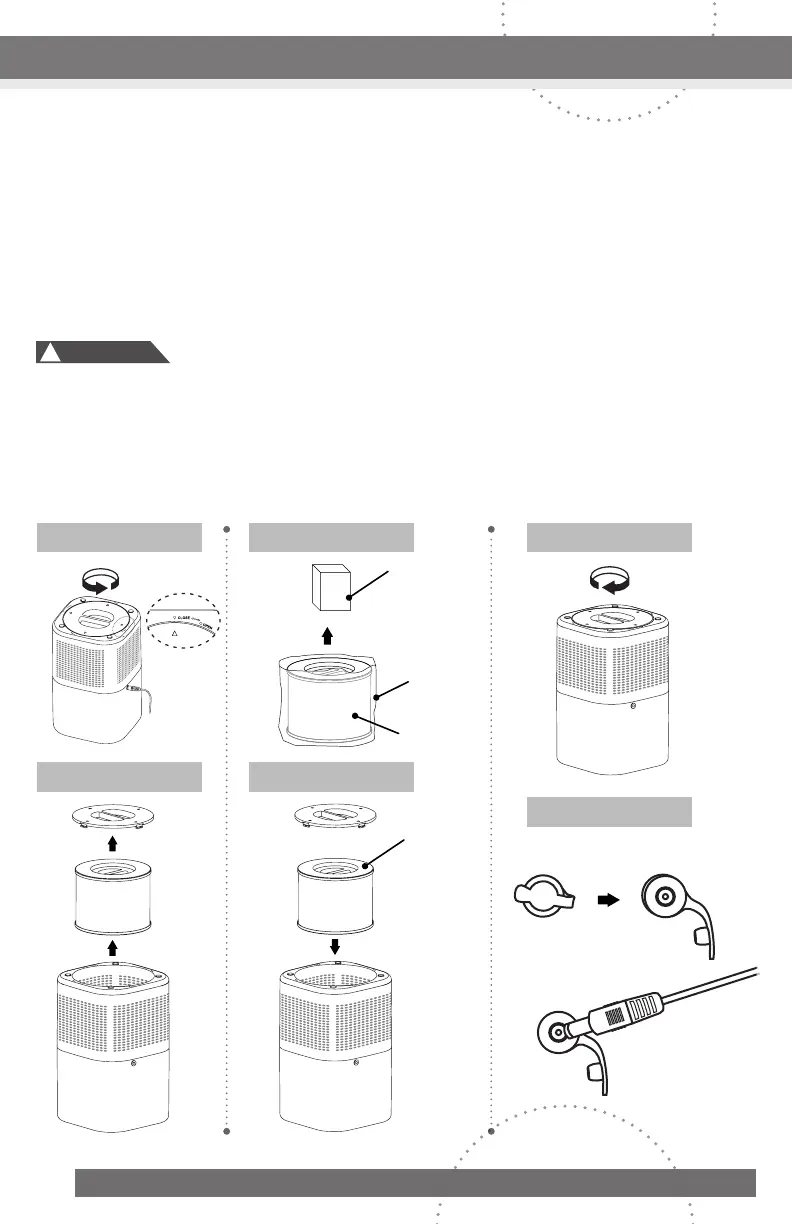
1. Fliptheairpurifierupsidedown.Turnthebottomcovercounterclockwisetoopenand
removethecarbonfilterfromthepurifier.(FIGURE1~2)
2. Removethepoweradaptorfromthepackageandremovetheplasticbagfromthe
filter.(FIGURE3)*
3. Placethefilterbackintothepurifierandclosethebottomcover.(FIGURE4~5)
4. Connectthepoweradaptertotheairpurifier’spowerportandpluginthepowercord
toanystandard120-voltACwalloutlet.(FIGURE6)**
*Removetheplasticbagfromthefilterbeforeuse.Operatingtheairpurifierwithoutfirst
removingtheplasticbagfromthefiltermayoverheatthemachineandcauseafire
hazard.
**Asocketoutletshouldbeneartheequipmentandbeeasilyaccessible.
Note: TomaintainthebestperformanceofyourairpurifieronlyuseofficialAurorafilters.
!
Caution:
CONTINUED NEXT PAGE
Figure 2
Figure 3Figure 1
Figure 4
Figure 5
Figure 6
Remove
plastic
bag
Openpowerportcover
Pluginpowercord
Handle
Facingup
Filter
Power
adapter
CLOSE
OPEN
CLOSE
OPEN
CLOSE
OPEN
CLOSE
OPEN
CLOSE
OPEN
CLOSE
OPEN
CLOSE
OPEN
CLOSE
OPEN
CLOSE
OPEN
CLOSE
OPEN
CLOSE
OPEN
CLOSE
OPEN
CLOSE
OPEN
CLOSE
OPEN
CLOSE
OPEN
CLOSE
OPEN



 To Next Page