
 Need help?
Do you have a question about the Aurora AU1030XA and is the answer not in the manual?
Key safety precautions for operating the shredder, including handling and environment.
Important safety guidelines regarding operation, maintenance, and potential hazards.
Instructions for correctly mounting the shredder head and connecting the power supply for operation.
Explanation of the control switch settings: REV, OFF, and AUTO for shredder operation.
Guidance on how to properly feed paper and credit cards into the shredder slot.
Understanding the indicator lights: Green for Ready, Red for Overheat.
Monthly procedure for oiling shredder blades using specific oils to maintain performance.
Instructions for safely cleaning the shredder unit using a dry cloth, avoiding water and flammable materials.
Steps to resolve issues when the shredder unit fails to operate, including power and seating checks.
Diagnosing and fixing problems where the shredder only operates in Reverse, not Auto mode.
Methods and steps to safely remove paper jams from the shredder using reverse and oil.
Troubleshooting steps for when the shredder remains constantly active in Auto mode.
Information on how to contact Aurora's service center for support, spare parts, and inquiries.
Details of the product warranty, coverage periods, terms, and conditions for repair or replacement.
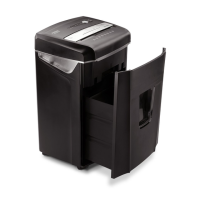
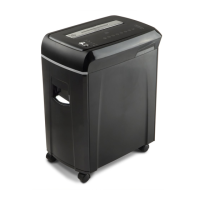
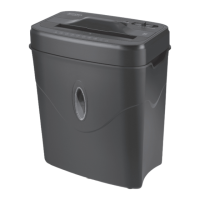
The Aurora AU1030XA is a crosscut paper and credit card shredder designed for personal and small office use, offering a secure way to dispose of sensitive documents. Its primary function is to cut paper and plastic credit cards into small, unreadable pieces, thereby protecting personal and confidential information from unauthorized access.
The shredder operates with a built-in safety interlock mechanism, ensuring it only functions when correctly mounted on its included wastebasket. This design prevents accidental operation and enhances user safety. The unit features a control switch with three main settings: AUTO/ON, OFF, and REVERSE, along with a FORWARD setting for jam removal.
In AUTO/ON mode, the shredder automatically starts when paper is inserted into the feed slot and stops once the paper has passed through. This hands-free operation makes shredding quick and convenient. The OFF setting completely deactivates the shredder, which is recommended for safety when the unit is unattended or not in use. The REVERSE setting is crucial for clearing paper jams; it reverses the cutting mechanism to loosen and back out jammed paper. Additionally, a FORWARD setting allows for manual activation of the shredder into cutting mode, which can also assist in clearing stubborn jams.
The shredder is capable of handling both paper and plastic credit cards. Paper should be fed as straight as possible into the main feed slot. For credit cards, they should be fed vertically into the middle of a dedicated entry slot, one at a time. The device is designed to shred staples and small paper clips, though removing them is recommended to extend the lifespan of the shredder's blades.
LED status indicators provide visual feedback on the shredder's operational status. A "READY Green" light indicates that the shredder is powered on and ready to operate. A "OVERHEAT Red" light signals that the shredder has been used continuously beyond its maximum running time and has overheated, prompting an automatic shutdown. In such cases, the unit requires a cool-down period before normal operation can resume.
The Aurora AU1030XA emphasizes user safety and ease of use. It is designed with several precautions to prevent injury and ensure proper operation. Users are warned against touching the document feed opening with hands, inserting foreign objects, or allowing loose clothing, jewelry, or hair near the paper entry slot due to the sharp blade edges and moving parts. The product is not intended for use by children.
The shredder's design includes a specific wastebasket that activates a safety switch, allowing the shredder to function. Using other wastebaskets or lining the provided one with a plastic bag may interfere with this mechanism and prevent the shredder from operating.
To prevent overfeeding and potential damage, users are advised not to exceed the specified sheet capacity. Overfeeding can strain the machine, leading to premature wear and breakage of cutting blades and internal components. Similarly, continuous use beyond the maximum running time can cause overheating, triggering the automatic shut-off feature.
For optimal performance and longevity, the manual provides clear instructions on how to handle paper jams. The REVERSE function is the primary method for clearing jams, but for more stubborn situations, applying shredder oil (or cooking oil) to the jammed paper and then using an index card or rigid cardstock to push it through in AUTO/ON mode is recommended.
The shredder also addresses issues like constant running in AUTO/ON mode, which can be caused by a blocked activation sensor. Cleaning the sensor with an index card or a cotton swab is suggested to resolve this.
Proper maintenance is crucial for extending the life and ensuring the continued efficiency of the Aurora AU1030XA shredder. The manual explicitly states that failure to properly maintain the shredder will void the warranty.
Oiling the Blades: Regular oiling of the shredder blades is a key maintenance task. Users are instructed to oil the blades monthly using basic vegetable oil, cooking oil, or dedicated shredder oil. The procedure involves turning off the shredder, applying oil across the paper entry, and then running the shredder in reverse mode for 3-5 seconds. This helps keep the blades lubricated and operating smoothly. It's important to note that lubricating oil is not included with the unit.
Cleaning the Shredder: The shredder should always be unplugged before cleaning to prevent electrical hazards. Cleaning should be done by carefully wiping the unit with a dry, soft cloth or towel. Users are strictly warned against cleaning or immersing the shredder in water, as this can damage electrical components. If the unit accidentally gets wet, it should be completely dried immediately. Flammable materials should never be used for cleaning, as they pose a serious injury and product damage risk.
General Care: To prevent the wastebasket from becoming too full, which can lead to shredded material being pulled back up into the shredder and causing jams, users are advised to empty it regularly. The shredder should also be kept away from water and heat sources. If the power cord is damaged, the shredder should not be used. Users are also cautioned against attempting to service the product themselves, as this can expose them to sharp cutting blades and electricity, and will void the manufacturer's warranty.
 General
| Cut Type | Cross-Cut |
|---|---|
| Sheet Capacity | 10 sheets |
| Security Level | P-4 |
| Cool Down Time | 30 minutes |
| Noise Level | 65 dB |
| Throat Width | 8.7 inches |




 To Next Page