Need help?
Do you have a question about the Aurora AU1230XA and is the answer not in the manual?
Select operating modes (Auto, Off, Reverse) using the unit's switch.
How to insert paper and credit cards, including Auto Reverse Technology.
Understanding the Green 'Ready' and Red 'Overheat' LED lights.
Steps for oiling shredder blades to ensure optimal performance and longevity.
Guidance on safely cleaning the shredder unit with a dry cloth.
Troubleshooting steps for when the shredder fails to operate at all.
Resolving issues when the shredder only runs in reverse, not auto mode.
Methods for clearing paper jams using reverse mode and other tools.
Fixing issues where the shredder continuously runs in Auto mode.
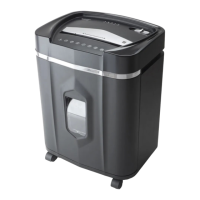
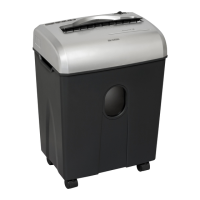
The Aurora AU1230XA is a crosscut paper shredder designed for personal and small office use, offering a secure way to dispose of sensitive documents and credit cards. Its primary function is to cut paper into small, confetti-like pieces, making it difficult to reconstruct the original document.
The shredder operates with an "Auto / On" mode, where it automatically starts shredding when paper is inserted into the feed slot and stops once the paper has passed through. This hands-free operation enhances user convenience. For safety, it is recommended to switch the shredder to the "Off" position when not in use or unattended. In the event of a paper jam, a "Reverse" mode is available to help clear the cutters by backing up the paper that did not pass through. This feature is crucial for maintaining the shredder's functionality and preventing damage. The device also incorporates "Auto Reverse Technology," which automatically stops the motor and rejects paper if it detects over-capacity shredding, preventing potential jams and damage to the cutting mechanism.
The Aurora AU1230XA is designed with user safety and convenience in mind. It features a built-in safety interlock mechanism, requiring the shredder head to be correctly mounted on its included wastebasket for operation. This prevents accidental activation and ensures proper alignment. The shredder is equipped with LED status indicators: a "Ready" (Green) light indicates it's powered on and ready for use, while an "Overheat" (Red) light signals that the unit has been used continuously beyond its maximum running time and needs to cool down. If overheating occurs, the shredder will automatically shut off for 45 minutes or longer to prevent damage.
The shredder can handle staples and small paper clips, though removing them is recommended to extend the lifespan of the shredder. Credit cards can also be shredded, but only one at a time, fed vertically into the middle of the feed slot. It's important to avoid overfeeding the shredder beyond its specified sheet capacity, as this can strain the machine, wear down cutting blades, and damage internal components. The design emphasizes straightforward operation, with a clear control switch for selecting modes and an easily accessible paper entry slot. The shredder's activation sensor is located near the center of the feed slot, requiring paper to be fed directly into this area for proper activation, especially for smaller items.
Proper maintenance is essential for the longevity and optimal performance of the Aurora AU1230XA. Regular oiling of the shredder blades is recommended monthly using basic vegetable, cooking, or shredder oil. The oiling procedure involves turning off the shredder, applying oil across the paper entry, and then running the shredder in reverse mode for 3-5 seconds to distribute the oil. It's important to note that lubricating oil is not included with the unit.
Cleaning the shredder requires caution. The unit should always be unplugged before cleaning. It should only be wiped with a dry, soft cloth or towel; never immerse the shredder in water, as this can damage electrical components. If the unit accidentally gets wet, it must be thoroughly dried immediately. Flammable materials should never be used for cleaning, as this poses a serious injury risk. Additionally, users are warned against spraying or keeping any aerosol products in or around the shredder and explicitly instructed not to use canned air on the shredder. These precautions help prevent damage and ensure safe operation.
Troubleshooting tips are also provided to address common issues. If the shredder doesn't work, users should check if it's plugged in, ensure the shredder head is correctly seated on the wastebasket (as the safety interlock mechanism prevents operation otherwise), and remove any plastic bags lining the wastebasket that might interfere with functionality. For paper jams, the reverse mode is the primary solution, but stubborn jams can be loosened by drizzling shredder oil into the feed slot and letting it soak before attempting to clear with an index card or rigid cardstock. If the shredder runs constantly in "Auto (On)" mode, it might indicate a blocked activation sensor, which can often be cleared by inserting a rigid card or by cleaning the sensor with a cotton swab (without using canned air). These maintenance guidelines are crucial for ensuring the shredder remains in good working condition and for validating the product warranty.
 General
| Run Time | 5 minutes |
|---|---|
| Weight | 15.43 pounds |
| Auto Start/Stop | Yes |
| Overload Protection | Yes |
| Jam Protection | Yes |
| Feed Opening Width | 8.7 inches |
| Sheet Capacity | 12 |
| Throat Width | 8.7 inches |
| Shreds | Credit Cards, Paper, Small Paper Clips, Staples |
| Power | 120V |


 To Next Page