7ENGLISH
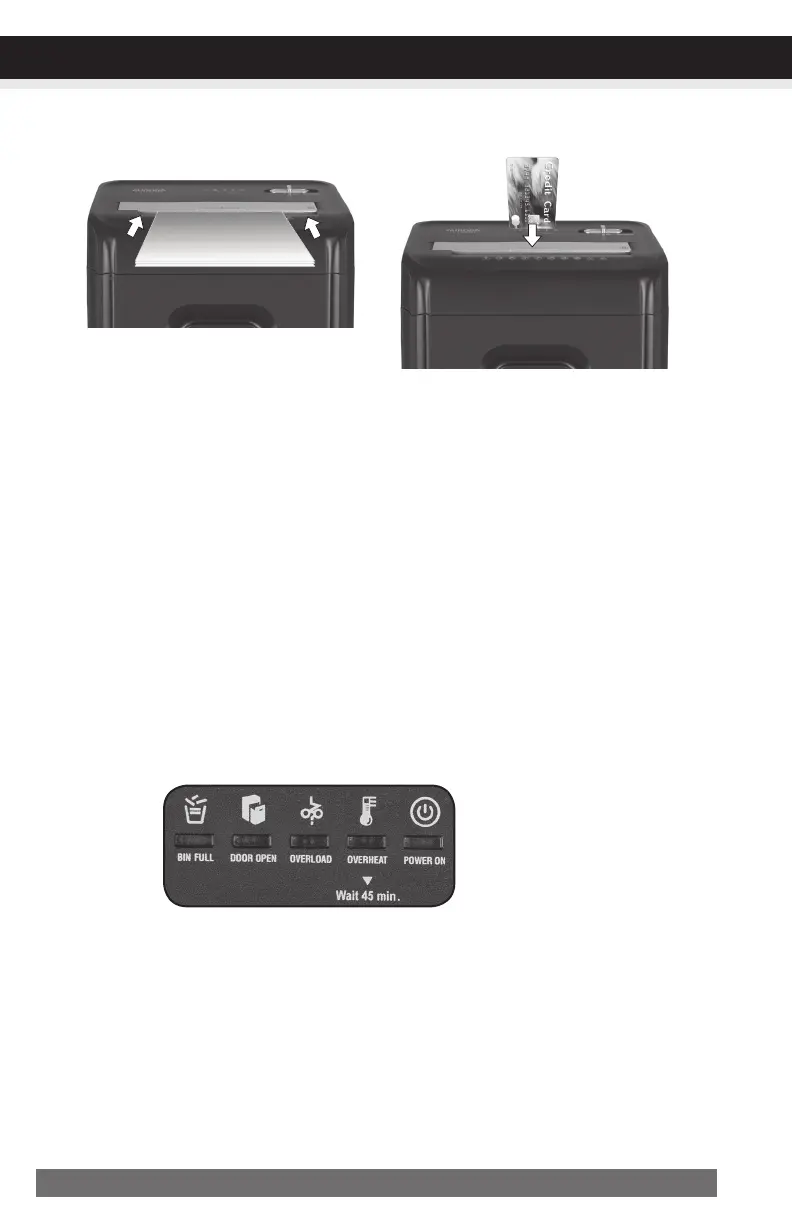
Paper/CreditCardEntry:
NOTE:
• Always turn off and unplug the shredder when not in use.
• This shredder will shred staples and small paper clips. It is recommended that you remove paper clips
whenever possible to extend the lifespan of your shredder.
• Only shred credit cards by feeding them vertically i nto the middle of the entry, releasing when
shredding begins. Never feed more than one credit card at a time.
• Overfeeding the shredder: Shredding beyond the specified sheet capacity can result in extensive
damage to the shredder. Overfeeding will strain the machine and quickly wear and break the cutting
blades and internal components.
• Overheating with extended use: In the event that the shredder has shred continuously beyond the
maximum running time and overheating, the unit will automatically shut off. If this happens, switch the
shredder off for 45 minutes or longer before resuming normal operation.
CONTINUED NEXT PAGE
Make sure you do not exceed sheet
count per pass (10 sheets max).
Insert paper as straight as pos-
sible into feed slot and release.
OPERATION
Insert one credit card at a time into
the middle of the feed slot.
•PowerOn:
The Green LED light indicates the shredder is “On” and ready to operate when paper is inserted.
•Overheat:
The Red LED light indicates the shredder has shred continuously beyond the maximum running time
and overheating, the unit will automatically shut off. If this happens, switch the shredder Off for 45
minutes or longer before resuming normal operation.
•Overload:
The Red LED light indicates when too much paper is inserted. Use the "Reverse" mode to back up
and reduce number of sheets.
LEDStatus
Indicators:
Binfull/Dooropen/Overload
/Overheat/PowerOn






 To Next Page