6 ENGLISH
OPERATION
CONTINUED NEXT PAGE
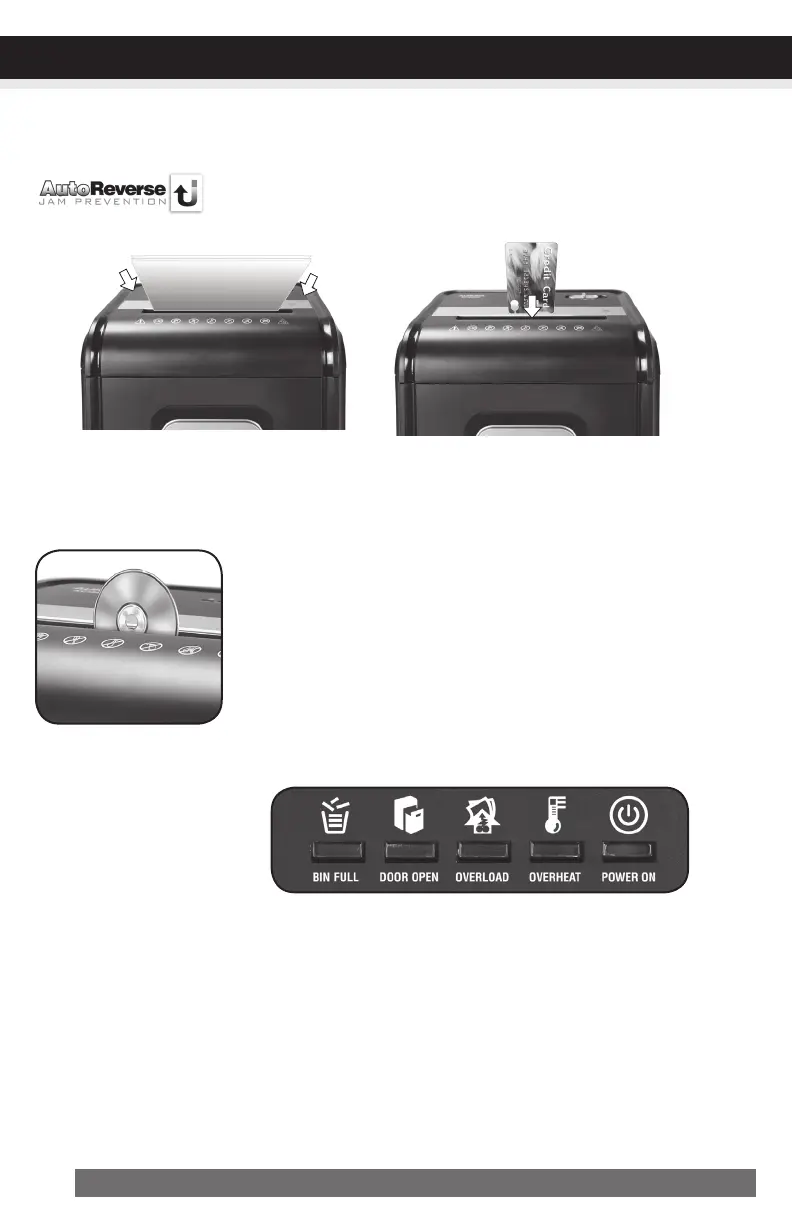
Paper/CreditCard/CDsEntry:
Make sure you do not exceed sheet
count per pass (18 sheets max).
Insert paper as straight as pos-
sible into feed slot and release.
Insert one credit card at a time into
the middle of the feed slot.
•PowerOn:
The Green LED light indicates the shredder is “On” and ready to operate when paper is inserted.
•Overheat:
The Red LED light indicates the shredder has shred continuously beyond the maximum running time
and overheating, the unit will automatically shut off. If this happens, switch the shredder Off for 45
minutes or longer before resuming normal operation.
LEDStatusIndicators:
Binfull/Dooropen/Overload/Overheat/PowerOn
FeaturesaCD/DVDdestroyer:
Do not hold CD/DVD with finger through the center ring while feed-
ing into the shredder. Serious injury may occur.
Never feed more than one credit card or CD/DVD at a time.
1) Hold the CD/DVD by the edge and feed one at a time, releasing
when shredding begins.
2) Shredder will stop when the entire disc has been destroyed.
AutoReverseTechnology
When the shredder detects over-capacity shredding, the motor will immedi-
ately stop and reject paper before actual shredding begins.


 To Next Page