Picture 5 Picture 6
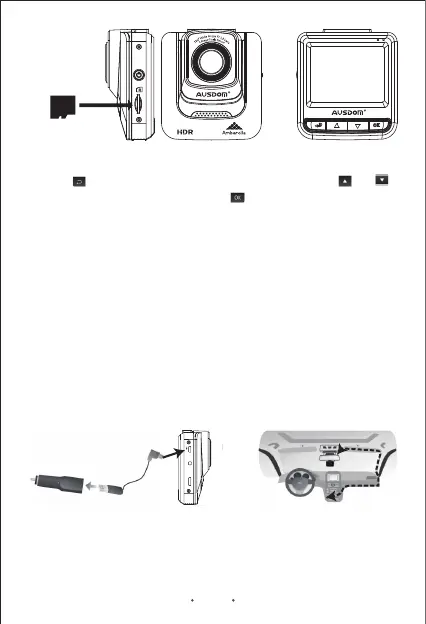
2.Press button to enter menu configurations, press the or
button to select format item and press button to start formatting the
memory card. (Refer to Picture 6)
1.Connect the small end of the power/transmission cable to the USB
connector located on the side of the unit.
2.Connect the other end of the power/transmission cable to the
supplied car charger. (Refer to Picture 7)
3.Plug the supplied car charger into the car’s lighter socket. (Refer to
Picture 8)
4.The unit will power on and start recording automatically once you
start the car engine.
Note:
-Make sure the memory card has been formatted before the initial using.
-Do not remove the memory card during recording and firmware updating.
-You have to insert a memory card into the unit before connecting the
unit to the power supply.
3.To remove the memory card, just push to eject memory card out of
the slot.
Memory Card
Connecting to Power
Picture 8Picture 7
Car Charger
Charging Cable
5V RESET HD out
EN 6


 To Next Page