5. Click on the disc icon in the upper right corner to display the data logging
menu, and click on “Stop data logging” to stop recording.
6. Do one of the following:
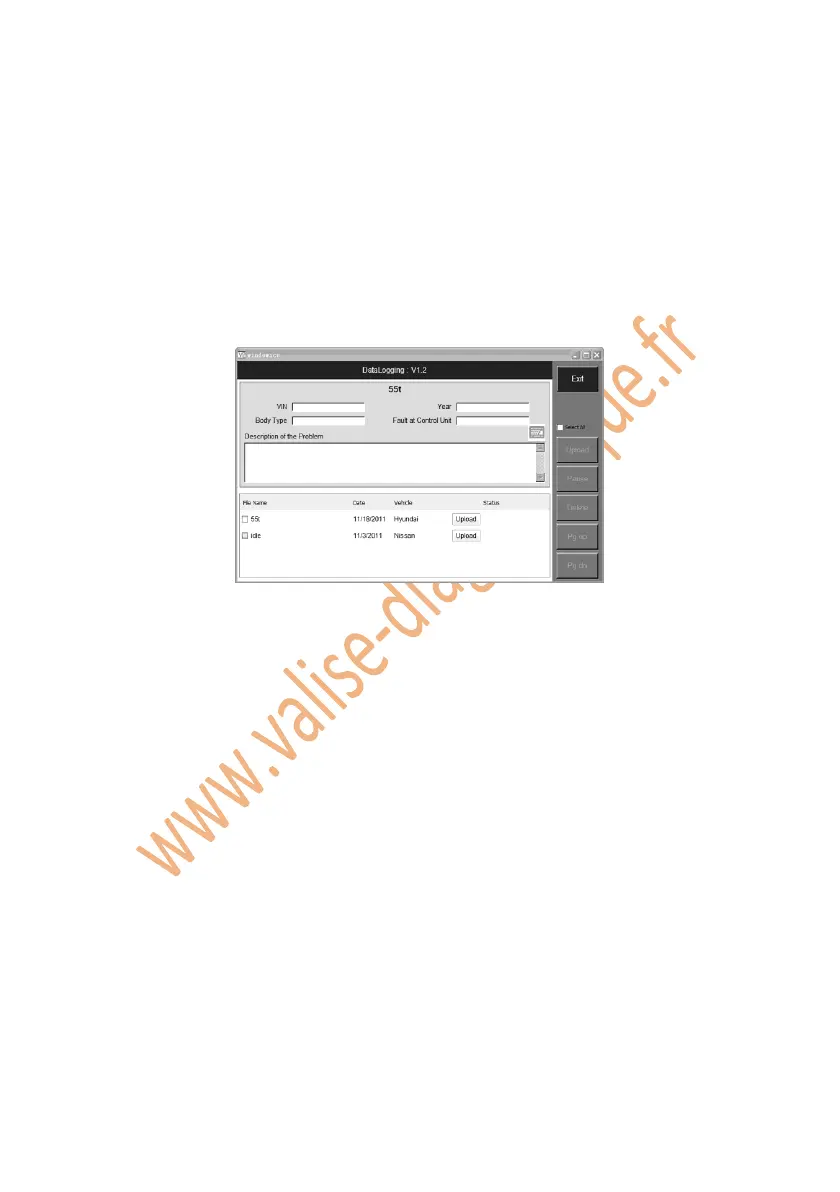
Click on “Report” from the data logging menu to enter the Data
Logging screen. Or,
Follow the instructions in the General Procedures to display the Data
Manager screen. Click on the Data Logging icon to enter the Data
Logging screen.
Figure 4.5: Data Logging Screen
7. You have to input all kinds of data for our engineers to identify the
fault(s), which include vehicle VIN, model year, body type, fault at
control unit, and detailed description of the problem. Afterwards, click on
Upload to send your problems to the Autel technical center.
8. To delete one or some of the data logging files, select the file(s) you
desired, and click on Delete on the right side of screen.
4.4. Screen Capture
The Screen Capture function allows you to take a picture of the test screen to
record visible items displayed on the monitor, and to print the pictures taken.
To take a picture, please follow these steps:
1. Click on the camera icon in the upper right corner of the screen if you
want to take a picture of the displaying screen.















 To Next Page