TURNING ON AND OFF THE TOUCH SCREEN DASH CAM
1. Plug the car charger into cigarette lighter or power supply or press O/M button, mirror turns on automatically.
2. When you shut off your vehicle, it will turn off according to the time you set.
Note:The Touch Screen Mirror Dash Cam is powered by a rechargeable Li-ion battery, but it can only last around 5 minutes without an
external power supply.
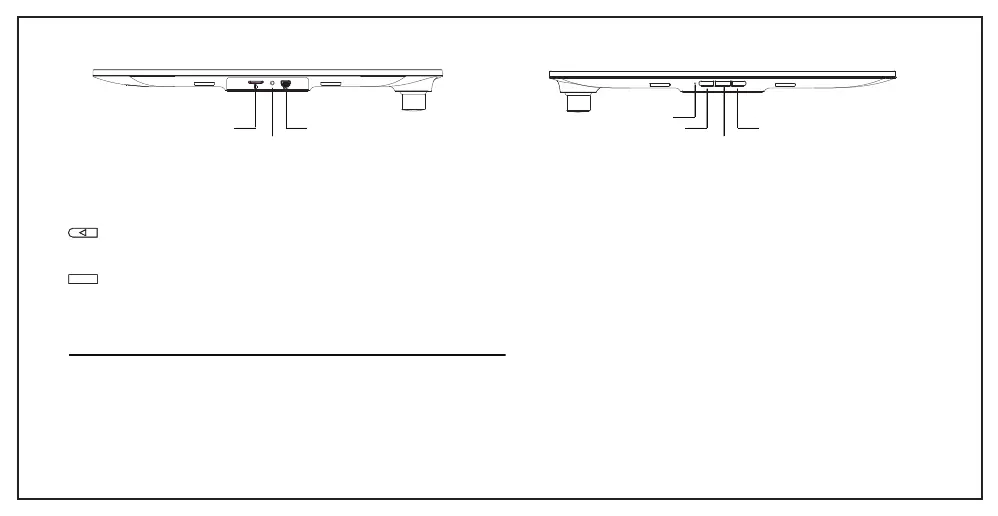
Note: Functions for those button
Left: Press to lock the video in Emergency folder.
Press and hold for 3 sec to capture.
O/M button: Press O/M button, LCD screen will be off meanwhile the dash cam still records. Press O/M button again, LCD screen will
show meanwhile the dash cam still records.
Press and hold for seconds to turn on or turn off.
3
Mini USB Port
Left
Micro-phone
Right
O/M Button
Micro-SD Slot
AV-IN(to connect
rear view camera)
O/M


 To Next Page