Autocom Air Helmet Fitting
To Fit Helmet Speakers and Microphone
1. Markinyourhelmetthepositionofyourear.Thiswillallowyoutotakethefulladvantageof
thesystem’ssoundquality*.
2. RemovetheprotectivepaperfromthebackoftheVelcroxingpadsandplacethembelow
your markings in the helmet and apply pressure. Now place the speakers on the Velcro pads.
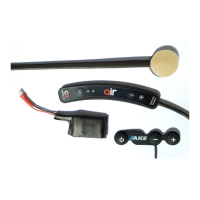
3. RoutethespeakercablestotheAirunitcableandconnecttotheYELLOWplugmarked“R”
and“L”.
4. RemovetheappropriatehelmetpaddingandinstalltheAutocomBoomMicrophone,withthe
microphoneelementcentrallypositioned,beigesideclosetothemouth.
5. RoutetheMicrophonecableandconnecttotheBLUEconnectorontheunit.**
*Thecloserthespeakersaretotheears,thebetterthequalityofthesound.Thespeakerscanbeplacedunderthe
foampaddingforbettercomfort.However,checkthispaddingdoesnotdegradethesoundquality.
**Foropenhelmetsakitisavailabletoprovideacoverforthemicrophonetohelpprotectagainstwindnoise.
To Fit Helmet Battery
1. Thebatteryshouldbettedwithinthepaddingofthehelmetinanyconvenientvoid.
2. RoutethebatterycableandconnecttotheREDconnectorontheAirunit.


 To Next Page