13
DAB+ Service Information
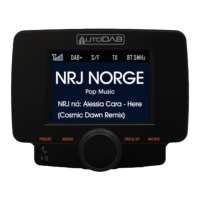
Relevant service information data broadcast by the radio station will
be displayed with scrolling text on the screen of the AutoDAB GO-S.
While listening to DAB+, the display will show the following if
applicable:
1. Channel Name
2. Frequency
3. Multiplex Name(DLS)
4. DAB+ Icon
5. Number of Channel Scanned and Stored
6. Time
7. Date
8. Signal Strength
9. FM Transmitting Frequency
10. Bluetooth Connection Status
11. Aux-In or Aux-Out Status
DAB to DAB Service Following ON/OFF
Control:
1. Press the MODE button until you scroll the screen to DAB+
mode
2. In DAB+ mode, press and hold FREQ/SF button to turn ON the
DAB to DAB service following function. An “ON” will be
displayed on the LCD screen and an “S/F” white icon will
appear at the top of the display. Repeat the same procedure


 To Next Page