2
MegaCode® Receiver Owner Installation Instructions
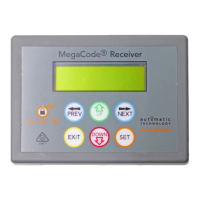
MegaCode® Receiver
Four Channel Multi-Frequency Receiver
Features 4
Operating Controls 6
Menu Structure 8
Initial Electrical Installation 9
Coding Transmitters 9
Transmitter Management 11
Code Operation (Location Empty) 12
Code Operation (Location Used) 12
Delete Operation 12
Edit Operation 12
Copy Operation 13
Remote Code Set Procedure 13
Parameter Viewing And Editing 14
Menus 2 Output One Setup 15
Menu 2.1: Output Pulse Time 15
Menu 2.2: Pulse Time Units 15
Menu 2.3: Flash On Time 15
Menu 2.4: Flash Off Time 15
Menu 2.5 Complete Flash Sequence 15
Menu 2.6: Output One Inverted 15
Menu 2.7: Trigger 1 Input 15
Menu 2.8: Trigger 1 Input Contact 15
Menu 2.9: Disable 1 Input Contact 15
Menus 3 Output Two Setup 15
Menu 3.1: Output Pulse Time 15
Menu 3.2: Pulse Time Units 15
Menu 3.3: Flash On Time 15
Menu 3.4: Flash Off Time 15
Menu 3.5 Complete Flash Sequence 15
Menu 3.6: Output Two Inverted 16
Menu 3.7: Trigger 2 Input 16
Menu 3.8: Trigger 2 Input Contact 16
Menu 3.9: Disable 2 Input Contact 16
Menus 4 Output Three Setup 16
Menu 4.1: Output Pulse Time 16
Menu 4.2: Pulse Time Units 16
Menu 4.3: Flash On Time 16
Menu 4.4: Flash Off Time 16
Menu 4.5 Complete Flash Sequence 16
Menu 4.6: Output Three Inverted 16
Menu 4.7: Trigger 3 Input 16
Menu 4.8: Trigger 3 Input Contact 16
Menu 4.9: Disable 3 Input Contact 16
Menus 5 Output Four Setup 17



 To Next Page