DL06 Micro PLC User Manual, 3rd Edition, Rev. E
3-9
Chapter 3: CPU Specifications and Operation
1
2
3
4
5
6
7
8
9
10
11
12
13
14
A
B
C
D
Auxiliary Functions
Many CPU setup tasks involve the use of Auxiliary (AUX) Functions. The AUX Functions
perform many different operations, ranging from clearing ladder memory, displaying the scan
time, copying programs to EEPROM in the handheld programmer, etc. They are divided into
categories that affect different system parameters. Appendix A provides a description of the
AUX functions.
You can access the AUX Functions from DirectSOFT or from the D2–HPP Handheld
Programmer. The manuals for those products provide step-by-step procedures for accessing
the AUX Functions. Some of these AUX Functions are designed specifically for the Handheld
Programmer setup, so they will not be needed (or available) with the DirectSOFT package.
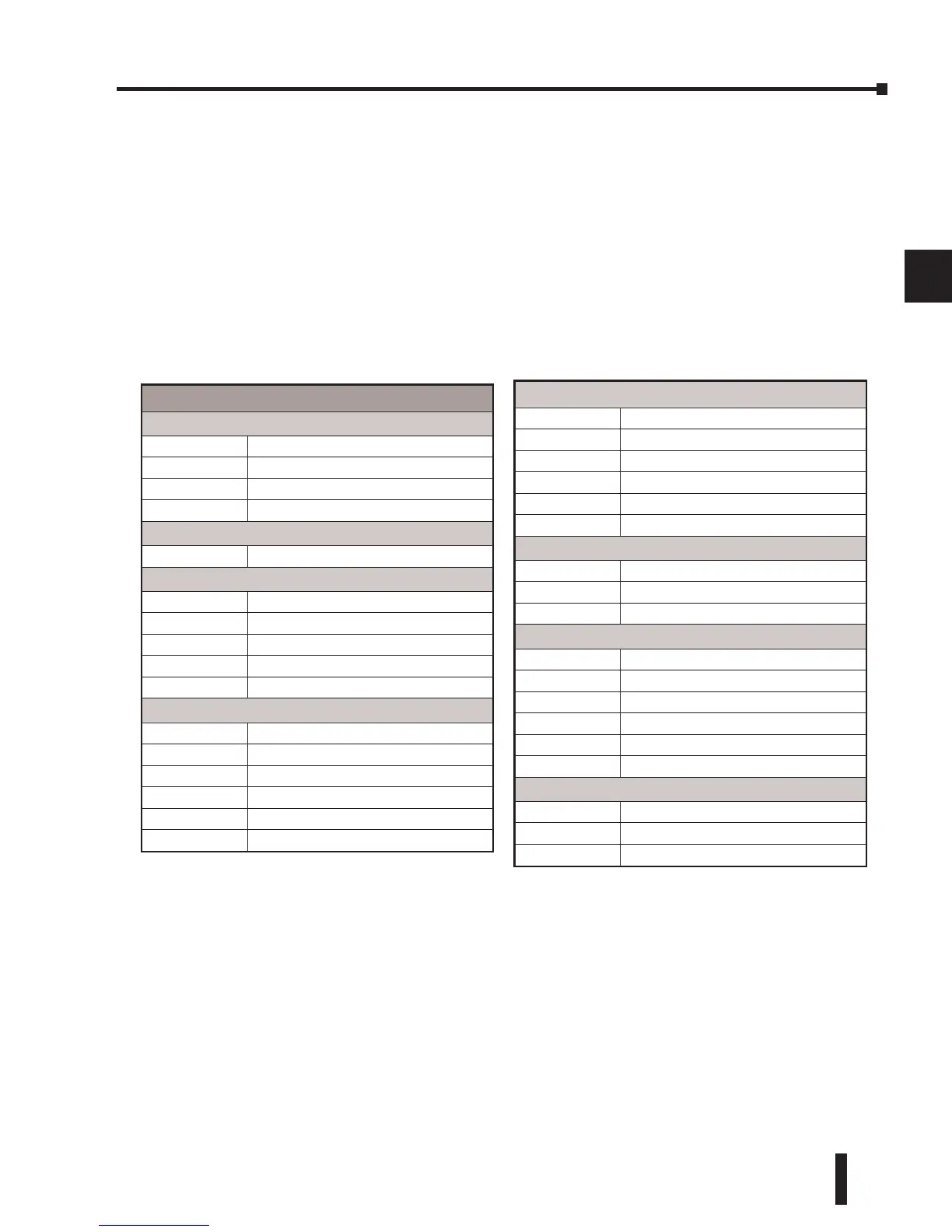
The following table shows a list of the Auxiliary functions for the Handheld Programmer.
Clearing an Existing Program
Before you enter a new program, be sure to always clear ladder memory. You can use AUX
Function 24 to clear the complete program. You can also use other AUX functions to clear
other memory areas.
• AUX 23 — Clear Ladder Range • AUX 24 — Clear all Ladders • AUX 31 — Clear V-memory
Initializing System Memory
The DL06 Micro PLC maintains system parameters in a memory area often referred to as the
scratchpad. In some cases, you may make changes to the system setup that will be stored in system
memory. For example, if you specify a range of Control Relays (CRs) as retentive, these changes
are stored in system memory. AUX 54 resets the system memory to the default values.
Auxiliary Functions (cont’d)
57 Set Retentive Ranges
58 Test Operations
59 Override Setup
5B HSIO Configuration
5C Display Error History
5D Scan Control Setup
AUX 6* — Handheld Programmer Configuration
61 Show Revision Numbers
62 Beeper On / Off
65 Run Self Diagnostics
AUX 7* — EEPROM Operations
71 Copy CPU memory to HPP EEPROM
72 Write HPP EEPROM to CPU
73 Compare CPU to HPP EEPROM
74 Blank Check (HPP EEPROM)
75 Erase HPP EEPROM
76 Show EEPROM Type (CPU and HPP)
AUX 8* — Password Operations
81 Modify Password
82 Unlock CPU
83 Lock CPU
Auxiliary Functions
AUX 2* — RLL Operations
21 Check Program
22 Change Reference
23 Clear Ladder Range
24 Clear All Ladders
AUX 3* — V-Memory Operations
31 Clear V-memory
AUX 4* — I/O Configuration
41 Show I/O Configuration
42
I/O Diagnostics
44
Power Up I/O Configuration check
45
Select Configuration
46 Configure I/O
AUX 5* — CPU Configuration
51 Modify Program Name
52
Display/Change Calendar
53 Display Scan Time
54 Initialize Scratchpad
55 Set Watchdog Timer
56 Set Communication Port 2


 To Next Page
 Loading...