DL06 Micro PLC User Manual; 3rd Edition Rev. E
4–8
Chapter 4: System Design and Configuration
1
2
3
4
5
6
7
8
9
10
11
12
13
14
A
B
C
D
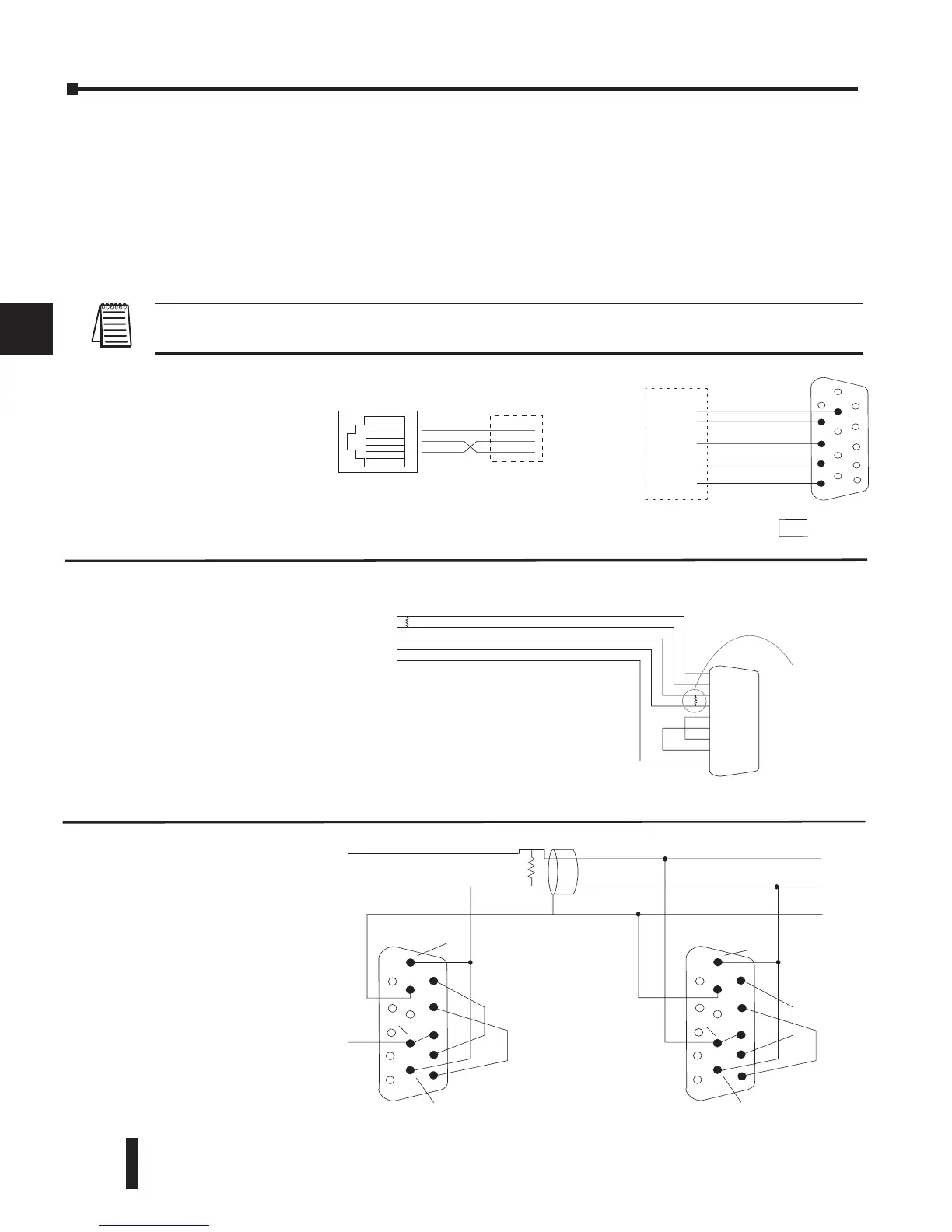
RS-232 Network
Choosing a Network Specification
The DL06 PLC’s multi-function port gives you the option of using RS-232C, RS-422, or
RS-485 specifications. First, determine whether the network will be a 2-wire RS–232C type, a
4-wire RS–422 type, or a 2-wire/4-wire RS-485 type.
The RS–232C specification is simple to implement for networks of shorter distances (15
meters max) and where communication is only required between two devices. The RS–422
and RS-485 signals are for networks that cover longer distances (1000 meters max.) and for
multi-drop networks (from 2 to 247 devices).
NOTE: Termination resistors are required at both ends of RS–422 and RS-485 networks. It is necessary to
select resistors that match the impedance rating of the cable (between 100 and 500 ohms).
DL06 CPU Port 2
TXD+ / RXD+
TXD– / RXD–
Termination
Resistor
Signal GND
Connect shield
to signal ground
TXD+
TXD–
RXD–
RXD+
0V
TXD+
TXD–
RXD–
RXD+
0V
TXD+ / RXD+
TXD– / RXD–
Signal GND
TXD+ / RXD+
TXD– / RXD–
Signal GND
RTS+
RTS–
CTS+
CTS–
RTS+
RTS–
CTS+
CTS–
DL06 CPU Port 2
1
6
11
1
6
11
5
10
15
5
10
15
The recommended cable for
RS422 is AutomationDirect L19954
(Belden 9842) or equivalent.



 To Next Page