DL06 Micro PLC User Manual, 3rd Edition, Rev. E
5-20
Chapter 5: Standard RLL Instructions
1
2
3
4
5
6
7
8
9
10
11
12
13
14
A
B
C
D
NOTE: When using DirectSOFT, these instructions can only be entered from the Instruction Browser.
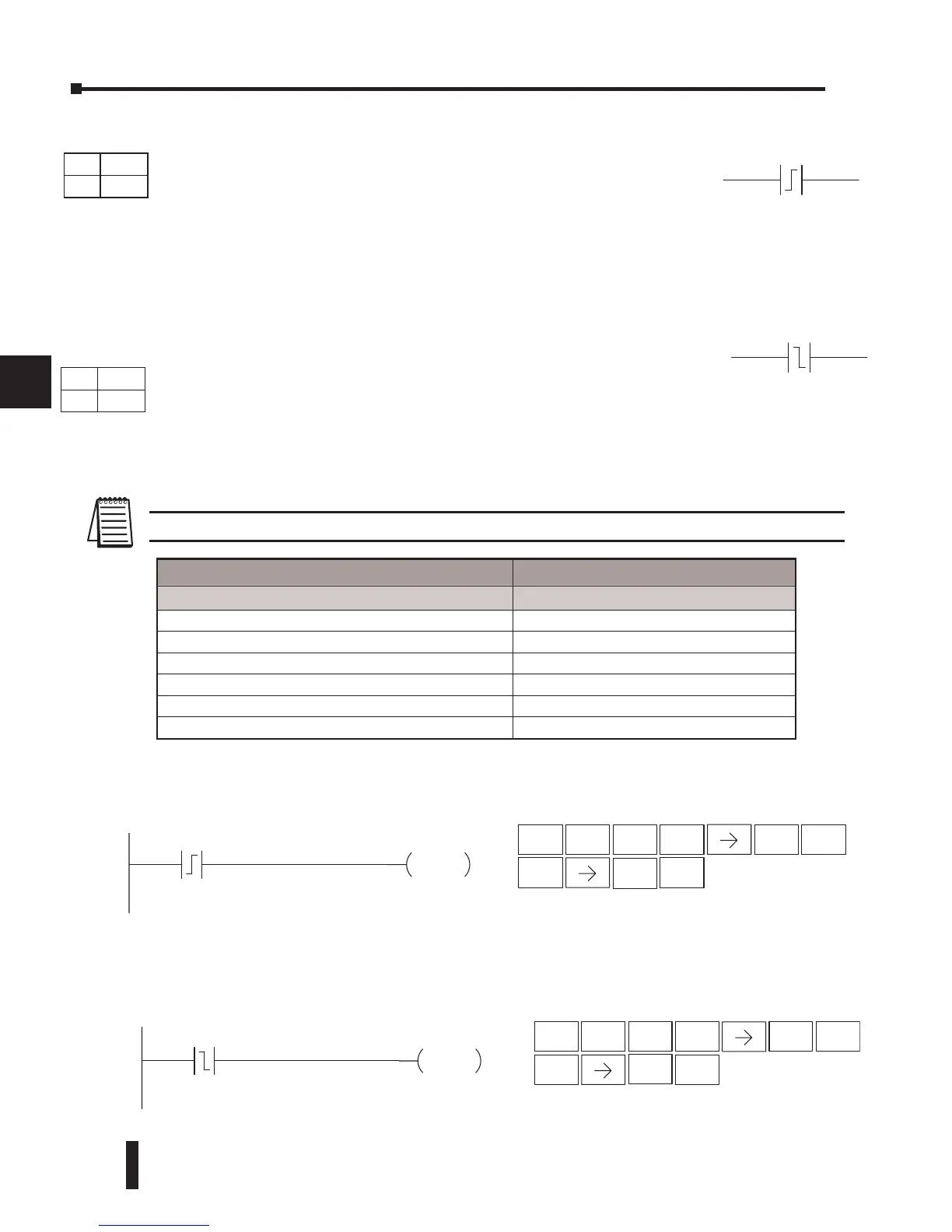
In the following example, each time X1 makes an Off-to-On transition, Y4 will energize for
one scan.
In the following example, each time X1 makes an On-to-Off transition, Y4 will energize for
one scan.
Aaaa
Aaaa
Y4
OUT
DirectSOFT32
X1
STR
$
CV
P
ENT
OUT
GX
3
D
SHFT
1
B
ENT
Handheld Programmer Keystrokes
4
E
Y4
OUT
Direct
SOFT32
X1
STR
$
TMR
N
ENT
OUT
GX
3
D
SHFT
1
B
ENT
Handheld Programmer Keystrokes
4
E
Operand Data Type DL06 Range
A
aaa
Inputs X 0–777
Outputs Y 0–777
Control Relays C 0–1777
Stage S 0–1777
Timer T 0–377
Counter CT 0–177
DS Used
HPP Used
DS Used
HPP Used
DirectSOFT
DirectSOFT
Store Positive Differential (STRPD)
The Store Positive Differential instruction begins a new rung or an
additional branch in a rung with a contact. The contact closes for one
CPU scan when the state of the associated image register point makes
an Off-to-On transition. Thereafter, the contact remains open until the
next Off-to-On transition (the symbol inside the contact represents the
transition). This function is sometimes called a “one-shot”. This contact
will also close on a program-to-run transition if it is within a retentative
range.
Store Negative Differential (STRND)
The Store Negative Differential instruction begins a new rung or an
additional branch in a rung with a contact. The contact closes for one
CPU scan when the state of the associated image register point makes
an On-to-Off transition. Thereafter, the contact remains open until
the next On-to-Off transition (the symbol inside the contact represents
the transition).



 To Next Page