DL06 Micro PLC User Manual, 3rd Edition, Rev. E
5-161
Chapter 5: Standard RLL Instructions
1
2
3
4
5
6
7
8
9
10
11
12
13
14
A
B
C
D
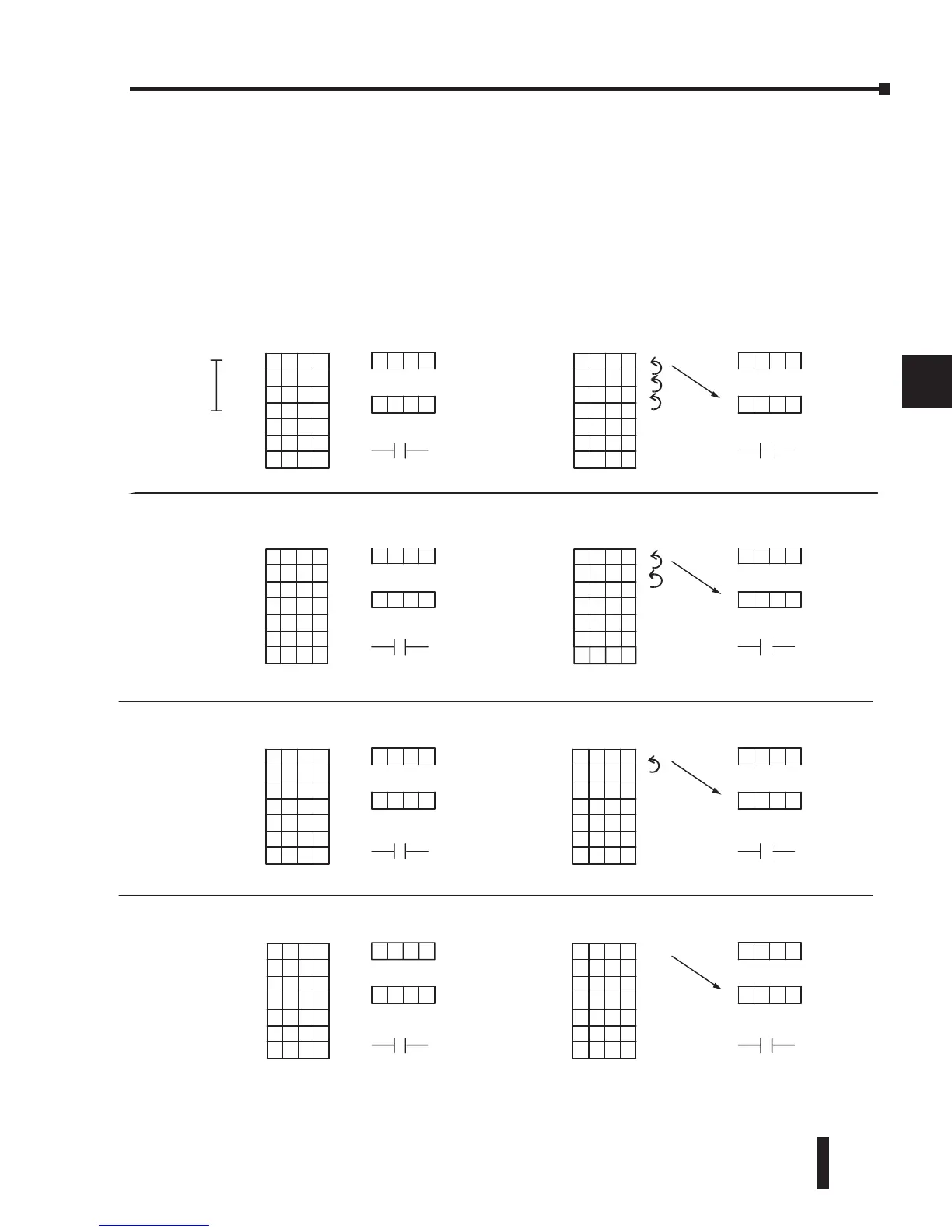
The following diagram shows the scan-by-scan results of the execution for our example
program. In our example, we show the table counter set to 4, initially. (Remember, you can
set the table counter to any value that is within the range of the table.) The table counter
automatically decrements from 4 to 0 as the instruction is executed. Notice how the last two
table positions, 5 and 6, are not moved up through the table. Also, notice that SP56, which
comes on when the table counter is zero, is only on until the end of the scan.
V1401
8989
V1402
8989
V1403
8989
V1404
8989
V1405
1010
V1406
2046
V1407
XXXX
V1401
8989
V1402
8989
V1403
8989
V1404
8989
V1405
1010
V1406
2046
V1407
XXXX
V1401 8989
V1402
8989
V1403
8989
V1404
8989
V1405
1010
V1406
2046
V1407
XXXX
V1401
4079
V1402
8989
V1403
8989
V1404
8989
V1405
1010
V1406
2046
V1407
XXXX
V1401
9999
V1402
4079
V1403
8989
V1404
8989
V1405
1010
V1406
2046
V1407
XXXX
1
2
3
4
5
6
1
2
3
4
5
6
V1401
0500
V1402
9999
V1403
3074
V1404
8989
V1405
1010
V1406
2046
V1407
XXXX
V1500
XXXX
1
2
3
4
5
6
V1400
0004
V1401
9999
V1402
4079
V1403
8989
V1404
8989
V1405
1010
V1406
2046
V1407
XXXX
V1500
0500
Destination
V1400
0003
V1500
9999
Destination
V1400
0002
V1500
4079
V1400
0001
V15000500
1
2
3
4
5
6
V1400
0003
V1500
9999
1
2
3
4
5
6
V1400
0002
SP56=OFF
SP56
SP56=OFF
SP56
SP56=OFF
SP56
V1500
8989
V1400
0000
V1500
4079
1
2
3
4
5
6
V1400
0001
SP56
SP56=OFF
SP56
SP56=OFF
SP56
SP56=OFF
SP56
SP56=OFF
SP56
TableCounter
(Automatically decrem ented)
V1401
4079
V1402
8989
V1403
8989
V1404
8989
V1405
1010
V1406
2046
V1407
XXXX
1
2
3
4
5
6
0
5
0
0
9
9
9
9
4
0
7
9
1
2
3
4
5
6
8
9
8
9
Before RFT Execution
Table
Table Counter
Destination
Table Counter
indicates that
these 4
positions will
be
used
After RFT Execution
Table
Before RFT Execution
Table
After RFT Execution
Table
Before RFT Execution
Table
After RFT Execution
Table
Before RFT Execution
Table
After RFT Execution
Table
Table Counter
Table Counter
Table Counter
Destinatio
Destination
Destination
Start here
Start here
Start here
Start here
Scan N+3
Scan N+2
Scan N+1
Scan N
Destination
Destination
SP56 = ON
until end of scan
or next instruction
that uses SP56
Table Counter
(Automatically decremented)
Table Counter
(Automatically decremented)
Table Counter
(Automatically decremented)
.
.
.
.
.
.
.
.
.
.
.
.
.
.
.
.



 To Next Page