DL06 Micro PLC User Manual, 3rd Edition, Rev. E
3-6
Chapter 3: CPU Specifications and Operation
1
2
3
4
5
6
7
8
9
10
11
12
13
14
A
B
C
D
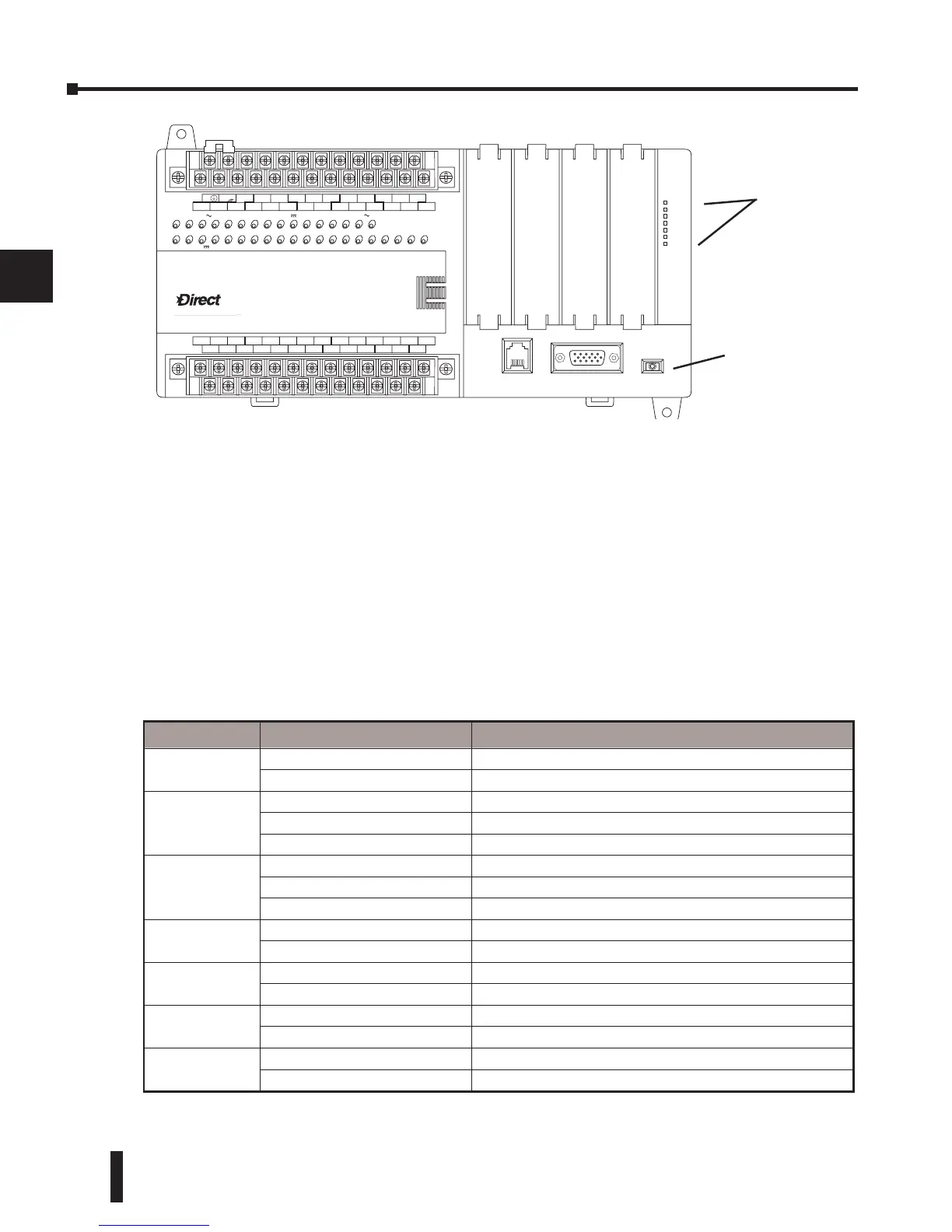
Status Indicators
The status indicator LEDs on the CPU front panels have specific functions which can help in
programming and troubleshooting.
Mode Switch Functions
The mode switch on the DL06 PLC provides positions for enabling and disabling program
changes in the CPU. Unless the mode switch is in the TERM position, RUN and STOP mode
changes will not be allowed by any interface device, (handheld programmer, DirectSOFT
programming package or operator interface). Programs may be viewed or monitored but no
changes may be made. If the switch is in the TERM position and no program password is in
effect, all operating modes as well as program access will be allowed through the connected
programming or monitoring device.
LOGI
C
Koyo
0
6
C0 C4C2X1 X3 X4 X6 X11 X13 X14 X16 X21X23 N.C.
C1 C3X2 X5 X7 X10 X12 X15X17 X20X22X0
N.C.
AC
(
N
)
24V
0V
N.C.
C1 C3Y0 Y15Y12Y10Y17Y7Y5Y2
C0 C2 Y16Y14Y13Y11Y6Y4Y3Y1
LG
G
AC
(
L
)
D0-06DR
2.0AOUTPUT: 6-240V 50 - 60Hz2.0A, 6 - 27V
INPUT: 12 - 24V 3 - 15mA
Y
X
40VA50-60HzPWR: 100-240V
0 12345671011121314151617202122
23
PORT1PORT2
TERM
RUN STOP
PWR
RUN
CPU
TX1
RX1
TX2
RX2
Indicator Status Meaning
PWR
ON Power good
OFF
Power failure
RUN
ON CPU is in Run Mode
OFF CPU is in Stop or Program Mode
Blinking CPU is in firmware upgrade mode
CPU
ON CPU self diagnostics error
OFF CPU self diagnostics good
Blinking The CPU indicator will blink if the battery is less than 2.5 VDC
TX1
ON Data is being transmitted by the CPU - Port 1
OFF No data is being transmitted by the CPU - Port 1
RX1
ON Data is being received by the CPU - Port 1
OFF No data is being received by the CPU - Port 1
TX2
ON Data is being transmitted by the CPU - Port 2
OFF No data is being transmitted by the CPU - Port 2
RX2
ON Data is being received by the CPU - Port 2
OFF No data is being received by the CPU - Port 2
status indicators
mode switch



 To Next Page