The AUTOOL BT60 is a Battery Capacity Monitor designed to assess the status of a car battery and its charging system. It provides real-time battery voltage display and indicates the engine starting performance through a series of LED indicators.
Function Description
The AUTOOL BT60 serves as a diagnostic unit for car battery lifespan. Its primary functions include:
- Engine Starting Performance Monitoring: Displays engine starting performance in 5 stages using LED indicators, providing information on the battery's status.
- Discharge Detection: Detects if the battery is discharged (e.g., due to forgotten headlights) and notifies the user that recharging is needed.
- Charging System Failure Detection: Identifies failures in the vehicle's charging system and alerts the user that the vehicle requires inspection.
- Voltage Display: Detects and displays the corresponding voltage value of the battery through 5 LEDs.
- Low Voltage Warning: If low voltage is detected, the buzzer will beep three times, and the device will enter sleep mode. After 8 seconds, it will switch back to working mode, repeating the cycle. For a 12V battery, the buzzer beeps if the voltage is below 10.5V; for a 24V battery, it beeps if the voltage is below 21V.
The device operates by diagnosing the battery status during engine starting and stopping. It consumes very little current, having almost no effect on the car battery even when continuously installed.
Important Technical Specifications
The AUTOOL BT60 supports both 12V and 24V battery systems, automatically identifying the battery type. The LED voltage values are categorized as follows:
| Battery type |
12V |
24V |
| 1# LED voltage value |
10.5V~11.2V |
21.0V~22.4V |
| 2# LED voltage value |
11.3V~12.0V |
22.5V~24.0V |
| 3# LED voltage value |
12.1V~12.8V |
24.1V~25.6V |
| 4# LED voltage value |
12.9V~13.5V |
25.6V~27.0V |
| 5# LED voltage value |
>13.5V |
>27.0V |
Usage Features
Precautions (Mandatory Compliance):
- Safety: Not for children. Do not use damaged or corroded leads/connectors. Do not cut or extend leads. Ensure power cable is properly connected.
- Compatibility: Only for 12V car batteries (Note: The parameter table indicates 12V and 24V support, so this point might be a general caution or specific to certain models).
- Installation: Follow the correct installation order. Fix the main unit with double-sided tape. Do not wipe with a dry cloth. Do not disassemble or modify. Discontinue use if peculiar smell or deformation occurs. Ensure battery vent holes are not blocked during installation.
- Environment: No water drops or other liquids on the surface. Wipe liquids with a damp cloth.
Before Use:
The device determines voltage fluctuation during engine starting in two stages. It stores the characteristics of a new battery as a reference for comparison to accurately assess the battery's condition.
Installation Steps:
- Confirm the car battery is in normal condition.
- Connect the red side connector to the "+" terminal of the battery. Insert the red side connector into the bolt of the side cable connector and firmly fix the nut.
- Connect the black side connector to the "-" terminal of the battery. Insert the black side connector into the bolt of the side cable connector and firmly fix the nut.
- The device will automatically identify 12V or 24V battery voltage, indicated by an LED.
- Once properly connected, the device will detect the battery voltage and display the corresponding value via 5 LEDs.
- Peel off the double-sided tape from the back of the product and stick it to the top of the battery.
- Start the engine; the LED will light up according to the corresponding voltage value.
Cautions during Installation:
- The connector is anti-drop type, so it may require firm, slow insertion.
- If the battery has a connector cover, ensure it does not interfere with the product installation.
- Do not install on the liquid port plug (vent) of the battery to prevent rupture.
- Install in a location where the liquid nozzle can be removed.
- Before attaching with double-sided tape, clean the adhesive surface of any dirt (oil, dust) with a damp cloth.
- For vehicles with battery protection covers, check installation space. If the battery is outside the engine compartment and has a protective cover, install the product inside the cover.
- If wires are too long and might contact moving parts (valve covers, belt fans), coil them to avoid contact.
- Leave about 1 cm of mounting space around the product for data reading.
- When installing in a car with the engine stopped, follow the vehicle maintenance manual completely to avoid consequences.
- For trucks or other vehicles where the battery is visible from outside, install the product in a normally invisible location that can still be seen during inspection.
Interpreting LEDs and Buzzer Warnings:
- Engine Starting Performance: Displayed in 5 levels by LED. Performance varies with temperature; low temperatures result in poorer performance. The diagnosis is based on vehicle-specific starting characteristics and may differ from a battery tester. External power supply or manual vehicle in gear without clutch engagement will not show correct performance.
- Buzzer Beeps:
- If the buzzer beeps and the battery performance LED does not light, it indicates a problem.
- Buzzer beeps may signal a problem with the vehicle's charging system; vehicle inspection is recommended.
- Buzzer beeps may indicate a malfunctioning charging system, heavy discharge, or an undercharged battery; charging and checking the vehicle are recommended.
- Buzzer beeps may also occur if lights were left on or the vehicle was driven for a long time, leading to a badly discharged battery. Charge the battery according to its manual. (Removing the product during charging is acceptable).
Maintenance Features
Cleaning the Car Battery Lifespan Diagnose Unit:
- Wet a cloth with water, wring it out, and wipe dirt.
- Do not use a dry cloth or materials that generate static electricity.
- Do not use volatile oil (petroleum), thinner, gasoline, or other organic solvents as cleaning agents.
Installation Inspection of Connectors:
- Ensure connectors are secure.
- If loose, tighten the nut firmly.
Warranty:
- 1-year warranty period.
- Repairs after the warranty period will be charged for replacement parts.
- Contact the manufacturer for service after a failure.
Items Not Covered by Warranty:
- Vulnerable parts: glass tube, signal sire, stickers, connectors pressure gauge, oil outlet pipe.
- Damage to the ultrasonic system caused by turning on the ultrasonic cleaning switch without cleaning agent in the ultrasonic tank.
- Oil pump filter screen blockage and oil pump burnout due to not replacing the testing agent after long-term use.
- Oil pump burnout caused by using fuel injector cleaning agent as fuel injector testing agent.
- Man-made faults.
Disclaimer: AUTOOL reserves the right to modify the manual and machine without prior notice. Physical appearance and color may differ from the manual. Contact dealer or AUTOOL after-service for inaccuracies. AUTOOL is not responsible for consequences arising from misunderstandings.

 Need help?
 General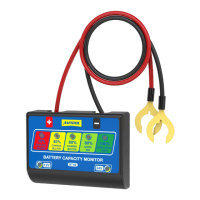

 To Next Page