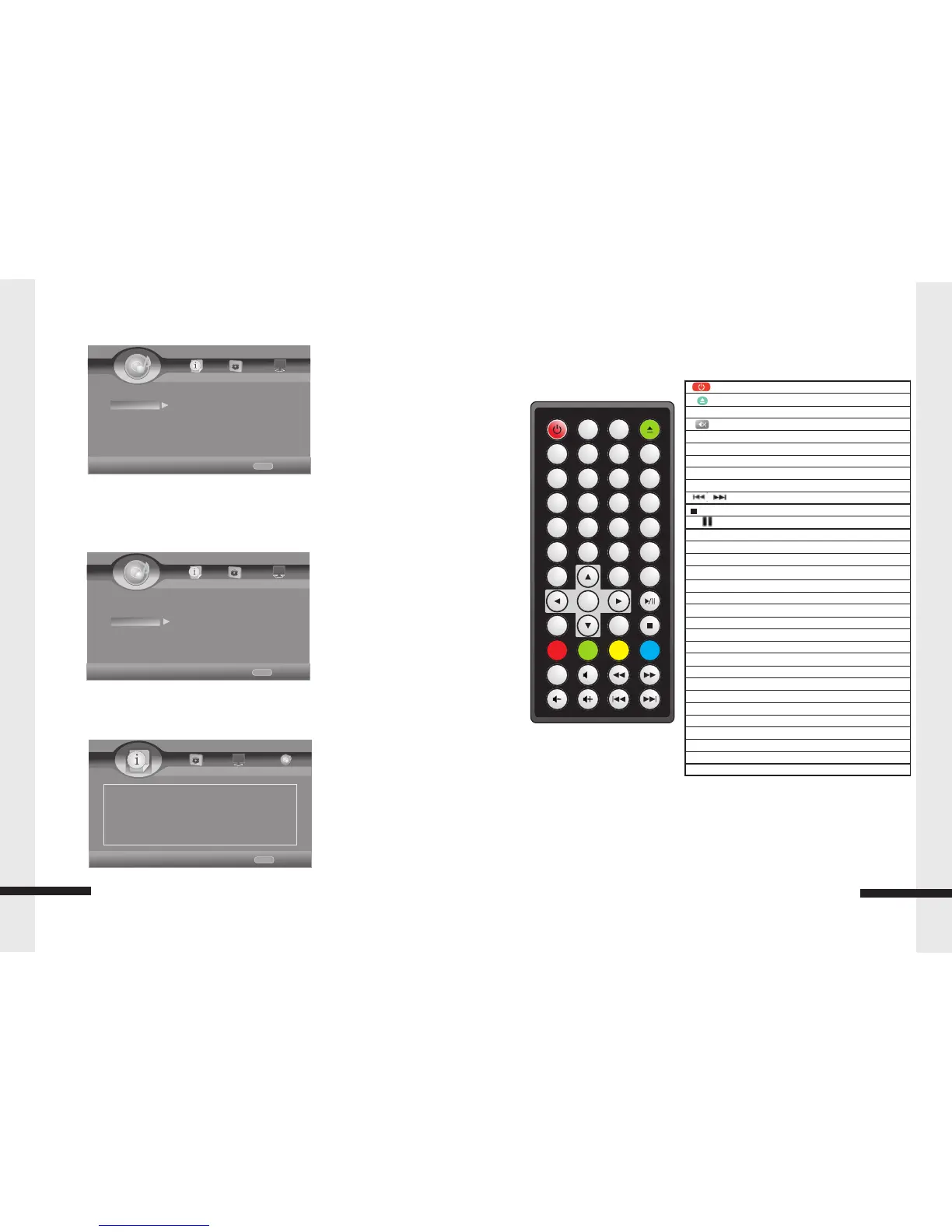
:Start / Standby
:Open / Close
No. Key:Input numbers Key 0, 1, 2…9
:Audio Mute Key
Display:Display files Information Key
VOL.:Press to Volume Up/Down
GOTO:Select playback
CLR:Press to clear an input error
ƒ ƒ / „ „ :Fast Return / Fast Forward
/ :Next Key / Previous Key s
:Stop Key
„ / :Press to pause / play the movie
SLOW:Slow Playback Key
OSC:Press to open Control Menu
HOME:Press to open HOME Menu
, ‚, ƒ , „ :Up/Down/Left/Right move Key s
ENTER:Enter Key
MEDIA CENTER:Press to Media C enter
RETURN:Return to the Previous Menu
PROG.: Program Play
B.MARK:Display bookmark menu
ZOOM:Display Zoom in/out Key
AUDIO:Change Audio channel Key
SUBT:Change Subtitle Key
MENU:Press to open a menu for disc
TITLE:Press to open POP Up/ti tle menu for disc
A-B / Repeat :Repeat A-B, Repeat Chapter/ Title/All/Off
2nd AUDIO:In PIP mode, select the second audio on/off
ANGLE:Change Video Angle (Requires disc support)
PIP:Picture-in-picture mode on or off
RESOLUTION :Change the Output Resolution
The Remote Control
NOTE:
Colour buttons (RED/GREEN/YELLOW/BLUE): Short cut keys for selecting items on
some BD's menus (can also be used for BD's Java interactive operations).
8
The remote control
RANDOM: Random playback
POWER
2
3
5
6
7
8
9
EN
T
ER
MEN
U
R
A
N
DOM
GO
TO
TI
TLE
R
E
P
E
AT
P
R
O
G
.
B.M
AR
K
Z
O
O
M
0
D
I
SP
L
A
Y
SL
O
W
R
ES
O
LU
-
TI
O
N
A
N
G
LE
S
U
BT
.
A
-
B
P
I
P
OS
C
2
n
d
AU
D
IO
A
U
D
I
O
HO
ME
R
ETU R
N
ME
DI
A
C
ENT E
R
C
LR
1
4
X
Speaker Setting
Test Tone – To test the Speaker
Post Process
EQ – Off/Rock/Pop/Live/Dance/Classical/Soft
UpMix – Off/PL2/NEO6
System Information
Display Software Version.
15
HOME
Exit
----Audio Setting----
Home Menu
Audio Output Test Tone More........
Speaker Sett...
Post Process
Use cursor key to move facus,use
“Enter”key to select
HOME
Exit
----Audio Setting----
Home Menu
Audio Output EQ off
UpMix off
Post Process
Speaker Sett...
Use cursor key to move facus,use
“Enter”key to select
HOME
Exit
----System Information—
Home Menu
Use cursor key to move facus,use
“Enter”key to select
Software Version: BDP V3.0
System Information


 To Next Page
 Loading...