EasyManua.ls Logo

Auvon AS8019 - User Manual

Auvon AS8019
40 pages
Print Icon
To Next Page IconTo Next Page
Loading...
Attention
The purpose of this Quick Guide is to help you
understand the operation of the TENS unit much
more quickly, and the contents of the quick guide
are not a substitute for the user manual. Please
read the user manual carefully before use to un-
derstand the contraindications and warnings.
Please consult your doctor before use if you’re not
sure whether you can use this device.
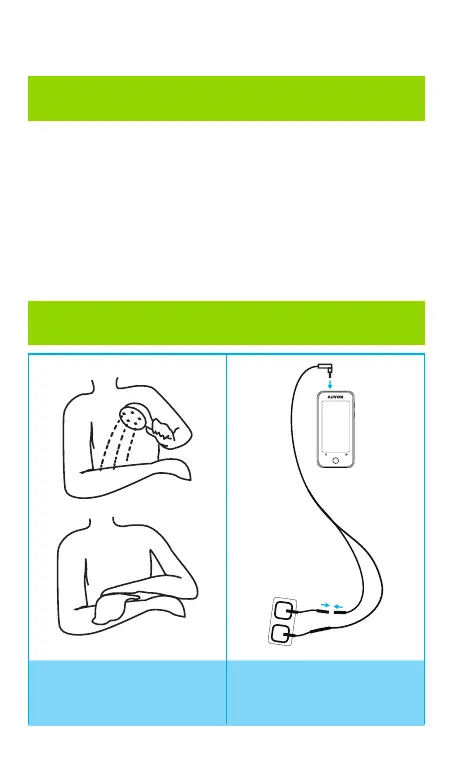
Operation
1. Clean the applica-
tion areas.
2. Connect the lead
wire to a pair of pads
and the device.
Quick Guide

Questions and Answers

Summary

Explanation of Pain

Explanation of TENS

Definition of Transcutaneous Electrical Nerve Stimulation (TENS) and its function.

Standard Package Contents

List of items included in the TENS device package.

Features

Technical Specifications

Details on channel, amplitude, waveform, voltage, power, size, weight, rate, width.

Product Illustrations

Device Component Identification

Diagram showing numbered parts of the TENS device.

Interface Element Labels

Explanation of labels and buttons on the device interface.

Operating Instructions

Important Notes Before Use

Guidelines on device usage during charging and auto-shutdown.

How to Use the Device

Step-by-step instructions for operating the TENS unit.

After Use Procedures

Steps for turning off, removing pads, and storing electrodes.

Pad Placement Guide

Neck Pad Placement

Instructions and modes for placing pads on the neck area.

Shoulder Pad Placement

Instructions and modes for placing pads on the shoulder.

Back Pad Placement

Instructions and modes for placing pads on the back.

Waist Pad Placement

Instructions and modes for placing pads on the waist.

Deltoid Pad Placement

Instructions and modes for placing pads on the deltoid area.

Arm Pad Placement

Instructions and modes for placing pads on the arm.

Elbow Pad Placement

Instructions and modes for placing pads on the elbow.

Wrist Pad Placement

Instructions and modes for placing pads on the wrist.

Hip Pad Placement

Instructions and modes for placing pads on the hip.

Leg Pad Placement

Instructions and modes for placing pads on the leg.

Knee Pad Placement

Instructions and modes for placing pads on the knee.

Calf Pad Placement

Instructions and modes for placing pads on the calf.

Ankle;Foot Pad Placement

Instructions and modes for placing pads on the ankle/foot.

Mode Instruction

Intensity Recommendation

Guidance on setting initial intensity levels and adjusting based on sensation.

Time Recommendation

Recommended usage duration and when to stop therapy.

Expected Feelings for Modes

Descriptions of sensations experienced with different TENS modes.

Mode Specifications

Detailed technical parameters for each of the 24 modes.

TENS Pads Holder

Pads Holder Features

Material and design features of the pads holder.

Pads Holder Instructions

How to use the pads holder for storing and organizing pads.

Safety Precautions and Warnings

Pain Management Warnings

Advice on consulting doctors and potential risks of using the device.

Prohibited Conditions

Conditions where the device should not be used due to damage or leakage.

Prohibited Individuals

Categories of people who should not use this device.

Prohibited Areas

Body areas where the pads should not be applied.

Prohibited Activities

Activities to avoid while using or with the device.

Pads Precautions

Guidelines for handling and applying electrode pads.

Troubleshooting Common Issues

Pads Not Working

Solutions for issues like single pad use, intensity, or poor connection.

Pads Not Sticking to Skin

Solutions for pads not adhering to skin due to film, moisture, or gel damage.

Uneven Intensity Sensation

Troubleshooting for one pad feeling stronger than the other.

Skin Irritation Issues

Solutions for skin turning red or feeling irritated.

Connection Problems

Solutions for not being able to plug wires into the device or pads.

Device Power and Control Issues

Solutions for device not turning on or adjusting mode/intensity/time.

Weak Intensity Sensation

Solutions for weak intensity, including pad attachment, film, stacking, cord, and battery.

Charging and Power Issues

Solutions for device not charging or cutting off during use.

Understanding Symbols

Device and Safety Symbols

Meanings of various symbols used in the manual and on the device.

Device Certification

Customer Service and Support

Warranty and Contact Information

Details on warranty, technical support, phone, and email.

Auvon AS8019 Specifications

General IconGeneral
BrandAuvon
ModelAS8019
CategoryFitness Equipment
LanguageEnglish

Related product manuals