EasyManua.ls Logo

Auvon TU2224-A - User Manual

Auvon TU2224-A
36 pages
Print Icon
To Next Page IconTo Next Page
Loading...
Attention
The purpose of this Quick Guide is to help you
understand the operation of the TENS unit
much more quickly, and the contents of the
quick guide are not a substitute for the user
manual. Please read the user manual careful-
ly before use to understand the contraindica-
tions and warnings. Please consult your doctor
before use if you’re not sure whether you can
use this device.
Operation
Note: Do not use it while charging.
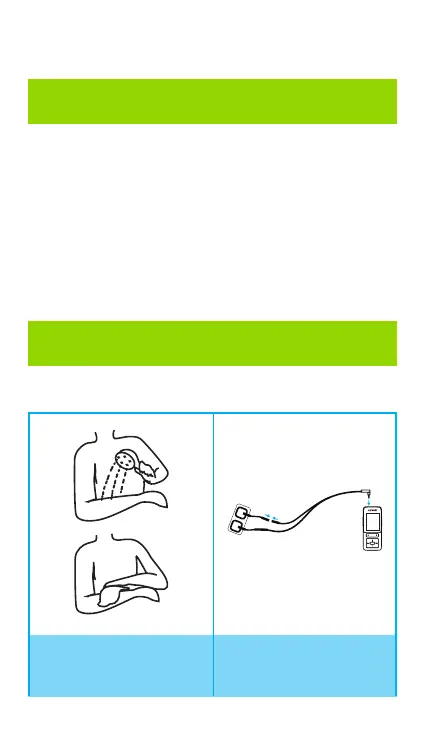
1. Clean and dry the
application areas.
2. Connect the lead
wire to a pair of
pads and the device.
Quick Guide

Questions and Answers

  • J
    Joseph JonesAug 6, 2025
    Why can't I adjust the intensity on my Auvon TU2224-A Fitness Equipment?
    • J
      Justin DyerAug 6, 2025
      If you're having trouble adjusting the intensity on your Auvon Fitness Equipment, here are a few things to check: * Make sure the correct channel icon (A or B) is selected and flashing if you want to adjust the intensity for that channel. * Ensure that the screen isn't locked. Look for a lock icon on the top right; touch the lock icon on the screen or press the lock button to unlock it. * Confirm that the electrode pads are firmly attached to clean, flat skin. * The intensity might be too low. Increase the intensity level and wait for a minute to feel the pulse.
  • D
    Daniel PooleAug 17, 2025
    What to do if my Auvon Fitness Equipment keeps turning off during use?
    • K
      Kenneth HendersonAug 17, 2025
      If your Auvon Fitness Equipment is cutting off during use, it could be due to a few reasons: * **Low battery:** Charge the battery fully. A full charge usually takes 2-3 hours. * **Countdown finished:** The timer may have run out. Use the “T” button to set the time between 10-90 minutes or select continuous mode for infinite time. * **Charging port issue:** Ensure the USB cable is properly aligned and fully inserted into the charging port, as it's designed with a narrow top and wide bottom.
  • R
    Ryan GillAug 27, 2025
    How to fix if one electrode pad feels stronger than the other on my Auvon Fitness Equipment?
    • N
      Nathaniel LopezAug 27, 2025
      If one electrode pad feels stronger than the other on your Auvon Fitness Equipment, consider the following: * Different body areas can react differently to the stimulation. Try swapping the position of the electrode pads. * Check for a poor wire connection. Ensure the wire is fully plugged into the output port. If the issue persists, try replacing the wire. * Make sure the distance between the pads is more than one inch apart. * A low battery can also cause this issue. Charge the device; a full charge may take 2-3 hours.

Summary

Important Safety Attention Notice

Pad Placement Suggestions

Square Electrode Placement

Visual examples of applying square electrodes to various body areas for optimal treatment.

Product Information

Explanation of TENS & EMS Technology

Defines TENS and EMS principles for pain relief and muscle stimulation.

Standard Package Contents

Lists all items included with the AUVON TENS device.

Device Component Illustrations

Operating Instructions

Pre-Use Notes and Warnings

Critical information and safety warnings before using the TENS unit.

How to Use the Device

Detailed steps for preparing, operating, and adjusting the TENS device settings.

Mode Instruction

Electrode Pad Management

Safety Precautions and Warnings

Trouble Shooting

Symbols and Certification

Device Symbols Explained

Explanation of various symbols and icons used on the device and in the manual.

Product Certification Details

Information on device compliance with industry standards and regulations.

Customer Service Information

Auvon TU2224-A Specifications

General IconGeneral
BrandAuvon
ModelTU2224-A
CategoryFitness Equipment
LanguageEnglish

Related product manuals