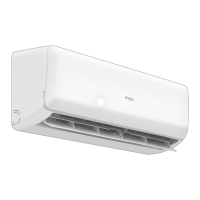
This document describes the AUX Type L remote controller for air conditioners, including its functions, usage, and maintenance. It also covers the installation and configuration of an ARV WiFi module for remote control via a mobile application.
Function Description
The remote controller allows users to operate an air conditioner with various modes and settings.
Basic Operation Buttons:
- ON/OFF: Starts or stops the air conditioner.
- SPEED: Selects fan speed from "Low," "Mid," "High," or "Auto."
- ▲/▼: Adjusts the setting temperature by 0.5°C increments, with a range of 16°C to 32°C. Continuous pressing changes the temperature quickly.
- COOL: Directly enters cooling mode.
- HEAT: Directly enters heating mode (not available for cooling-only units).
- SWING: Activates automatic horizontal wind direction vane swing. Pressing again stops the vanes at the desired position.
- HEALTH: Turns the health function on or off.
- SLEEP: Activates the air conditioner's sleep function, indicated by "SLEEP" on the display. Pressing MODE or ON/OFF cancels sleep mode.
- iFEEL: Sets the "iFEEL" function. The LCD shows the actual room temperature when set and the setting temperature when canceled. This function is invalid in Fan mode.
- TIMER: Sets the Timing On or Timing Off function.
- SILENCE: Turns silent operation mode on or off. The unit defaults to silence off when energized.
- TURBO: Turns turbo mode on or off for cooling or heating. This function cannot be set in auto, dry, or fan modes. The unit defaults to turbo off when energized.
- DISPLAY: Toggles the display on/off. When off, pressing it once turns the display off. Pressing it again shows ambient and setting temperatures for 5 seconds, useful for checking in darkness.
- iCLEAN: When the remote controller is off, pressing this button activates the "iCLEAN" function. This function cleans dust and dries the evaporator to prevent mold and strange smells. It runs for about 30 minutes and stops without further operation. Pressing "iCLEAN" or "ON/OFF" again exits the function.
- ELE. H (for auxiliary electric heating IDU): Activates auxiliary electric heating in heating mode.
- Anti-FUNGUS: Dries the evaporator to prevent mold and strange smells. To activate, with the A/C and remote controller off, press "Anti-FUNGUS" once. The buzzer will beep five times, indicating activation. To cancel, press "Anti-FUNGUS" again when the A/C and remote controller are off.
- SPOT SWING: Activates automatic horizontal wind direction vane swing. Pressing again stops the vanes at the desired position.
- ECO: In cooling mode, this button activates "ECO" economic operation mode for reduced power consumption. It runs for 8 hours and then automatically quits. Pressing "ECO" again quits the mode. The unit will turn off automatically if the timing mode runs out.
- iFavor: A shortcut button that allows users to save preferred settings (mode, wind speed, set temperature, swing) and operate the air conditioner with these settings by pressing it. To set, turn on the A/C, adjust to the desired mode, then press and hold the shortcut button for three seconds until the display glitters three times.
- MODE: Selects different operation modes: AUTO, COOL, DRY, FAN, HEAT.
Usage Features
Automatic Operation Mode:
- Press ON/OFF to start.
- Press MODE to select automatic mode.
- Press SPEED to select fan speed (LOW, MID, HIGH, AUTO).
- Press ON/OFF to stop.
Cooling/Heating Operation Mode (Cooling-only units do not have heating function):
- Press ON/OFF or HEAT/COOL to start.
- Press MODE to select Cooling or Heating.
- Press ▲/▼ to set temperature (16-32°C, 0.5°C increments).
- Press SPEED to select fan speed (LOW, MID, HIGH, AUTO).
- Press ON/OFF to stop.
Drying Operation Mode:
- Press ON/OFF to start.
- Press MODE to select DRY mode.
- Press ▲/▼ to set temperature (16-32°C, 1°C increments).
- Press SPEED to select fan speed (LOW, MID, HIGH, AUTO).
- Press ON/OFF to stop.
Timer Function:
- Clock Function:
- Open the remote controller lid, press TIMER.
- Press ▲/▼ to set the 12-hour clock time (a.m./p.m.).
- Press TIMER again to confirm.
- Timing ON Function (set when A/C is off):
- Open the remote controller lid, press TIMER; "ON" will display and flicker.
- Press ▲/▼ to set the 12-hour time (a.m./p.m.).
- Press TIMER again to confirm.
- Press other buttons to select operation conditions (mode, temperature, swing, fan speed, etc.).
Note: If Clock and Timing ON settings are the same, the A/C will automatically close or operate.
Fan Operation Mode:
- Press ON/OFF to start.
- Press MODE to select Fan mode.
- Press SPEED to select fan speed (LOW, MID, HIGH, AUTO).
- Press ON/OFF to stop.
Remark: Temperature setting is not available in circulation operation mode.
Sleep Operation Mode:
- Press ON/OFF to start.
- Press MODE to select cooling or heating.
- Open the wired controller lid, press SLEEP; "SLEEP" will display, activating the function.
- Press SLEEP again to cancel. The A/C will maintain its previous settings.
- Press ON/OFF to stop.
Sleep Function Operation (7 hours, then stops automatically):
- Cooling Mode: Setting T (°C) → T+1 (°C) (1st hour) → T+2 (°C) (2nd hour) → Keep running for another 5 hours → Stop automatically.
- Heating Mode: Setting T (°C) → T-2 (°C) (1st hour) → T-4 (°C) (2nd hour) → Keep running for another 5 hours → Stop automatically.
Maintenance Features
Battery Replacement:
- Slide and open the battery cover in the direction of the arrow.
- Insert two new AAA 1.5V batteries, ensuring correct polarity (+&-).
- Replace the cover.
Note: If the remote controller is not used for a long time, remove the batteries. Dispose of waste batteries properly.
WiFi Module (ARV WIFI Module) Configuration:
- APP Download: Scan the QR code or search "AC Freedom" in App Store/Google Play.
- Module Installation: Connect the WiFi module communication wire to the main PCB's WiFi interface. Place the module in the return air or another WiFi-accessible area.
- APP Configuration:
- Press the "HEALTHY" button 8 times consecutively on the remote controller (two beeps indicate configuration mode) OR press the S1 button on the WiFi module board for 5 seconds. The WiFi module's D1 light will flash quickly.
- Connect your mobile device to WiFi, open "AC Freedom," and follow the in-app steps: "Add device," enter WiFi name (auto-filled) and password, then "Start the configuration." The WiFi module indicator blinks intermittently.
- After configuration, "Finish" will appear, and the app will return to "Device list," showing the configured AC.
- Note: If configuration fails or the wireless router password changes, reset the WiFi module by turning its power on and repeating the APP configuration steps.
- AC Management:
- Modify AC name and locking function: Allows renaming the AC and locking it to prevent unauthorized access. If a locked AC is lost, the WiFi module must be reset before connecting a new mobile device.
- Remote-control device: Connect the wireless router to the internet and open GPRS for remote control and voice control functions to be effective.
Important Technical Specifications
Remote Controller:
- Operating distance: Within 8 meters of the air conditioner receiver.
- Battery type: Two AAA (7#) batteries (do not use electric batteries).
WiFi Module:
- Working temperature: 0~50°C
- Working environment humidity: 20~90%RH
- Dimensions: 78 x 52 x 15.5 mm
- Configuration cable wire length: 1500mm
General Notes:
- The manual shows a general remote controller with most functions; actual models may vary.
- All symbols are displayed upon initial power-on or re-electrification after power-off. In actual use, only relevant icons/names appear.
- Cooling-only units do not have heating or electric heating functions. Pressing such buttons on the remote controller will have no effect.
- Only use the remote controller specified for your indoor unit.
- Remote controller outside buttons are only valid when the surface cover is closed.
- The two white buttons are for addressing set only; once set, do not reset them yourself.
WEEE Warning:
Do not dispose of electrical appliances as unsorted municipal waste. Use separate collection facilities. Contact local government for information on collection systems. Improper disposal can lead to hazardous substances leaking into groundwater, damaging health. When replacing old appliances, retailers are legally obligated to take back old appliances for free disposal.

 Need help?
 General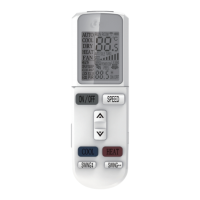

 To Next Page