EN
★ 2.1 Buttons description
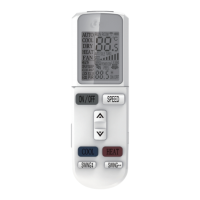
① "ON/OFF" button
You can start the air-conditioner by pressing this button and stop its operation by pressing it again.
© "SPEED" button
You can select fan speed from "Low", "Mid", "High", "Auto".
③ "A /▽ " button
When press " A " button, the setting temperature will be increased by 0.5°C. When press " V
button, the setting temperature will be decreased by 0.5oC
The temperature will be changed quickly by pressing the button continuously and setting
temperature range is 16°C to 32°C
④ "COOL" button
Press the COOL button, you can directly enter cooling mode.
⑤ "HEAT" button
Press the HEAT button, you can directly enter heating mode.
Note: cooling only unit has no heating function.
⑥ "SWING" button
Press this button, the horizontal wind direction vanes can swing automatically, when you have
the desired vertical wind direction, press it again, the horizontal wind direction vanes will be
stopped at the situation of your choice.
⑦ "HEALTH" button
Press this button; you can turn on or off the health function
⑧ "SLEEP" button
Press SLEEP button, then display screen shows " SLEEP",the sleeping function of the air
conditioner is activated.
Note: press the MODE or ON/OFF button, the remote controller clears sleeping
mode away.
® "IFEEL" button
Press this button to set "iFEEL” function.The LCD shows the actual room temperature when
the function set and it shows the setting temperature when the function cancelled.
This function is invalid at Fan mode.
3


 To Next Page