Need help?
Do you have a question about the Ava Fertility and is the answer not in the manual?
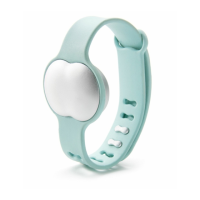
Identifies Ava as a fertility tracker for women monitoring health and cycles, not for contraception.
Lists the items included in the Ava package: sensor pod, strap, and charging cable.
Specifies the required operating systems for Ava synchronization: iOS 9.0+ and Android 5.0+.
Instructions on how to correctly attach the sensor pod to the Ava bracelet for proper fit.
Details the process of charging the Ava device using the provided USB cable.
Guide to downloading the Ava app and creating an account or logging in.
Step-by-step instructions for pairing the Ava device with the mobile app via Bluetooth.
Explains Ava is for sleep use only, requiring at least four hours for accurate measurements.
Provides guidance on the correct placement of Ava on the wrist for optimal data accuracy.
Describes how the device automatically detects wear and starts recording data, indicated by LED lights.
Instructions for synchronizing the Ava device with the app in the morning to view data.
Explains navigation icons and action buttons within the Ava app for iOS users.
Explains navigation icons and action buttons within the Ava app for Android users.
Details how to log cycle events like period flow, sex, and mood in the Ava app.
Explains the calendar view for an overview of recorded and predicted menstrual cycle events.
Describes how to view detailed physiological data and logs in a graphical format.
Instructions for editing user profile information, status, and previous pregnancies.
Explains the pregnancy mode features, including tracking parameters and due date countdown.
Details the pregnancy dashboard view, showing week count, due date, and trend indicators.
Instructions on how to log and track weight within the Ava app.
Specifies the safe operating temperature range for the Ava device.
Clarifies that Ava is not waterproof and advises against submersion or showering.
Provides recommendations for cleaning the Ava sensors to maintain signal quality.
Details the suitable wrist circumference range for wearing the Ava device.
Information about the rechargeable battery, its lifespan, and tips for maximizing battery life.
Guidance on proper disposal of Ava as electronic waste.
Information on where to find details about the return policy and warranty.
Directs users to the website for regulatory information and safety instructions.
Provides resources for further assistance, including FAQs and contact information.
Lists channels for updates and support, such as email and Facebook.

 To Next Page
 General