EasyManua.ls Logo

Avalon A1TL - User Manual

Avalon A1TL
93 pages
Print Icon
To Next Page IconTo Next Page
Loading...
A few simple steps to ensure
perfect water, every time.
English

Other manuals for Avalon A1TL

Question and Answer IconNeed help?

Do you have a question about the Avalon A1TL and is the answer not in the manual?

Summary

Were Here to Help

Contact Information

Provides phone, email, and live chat details for customer support and inquiries.

Lets Connect

Social Media and Website

Links to social media accounts and the official company website for news and updates.

Use and Care Guide

Product Models

Identifies the specific models covered by this guide: A1TL and A2TL.

Warranty Registration

Register Your Cooler Online

Instructions to register the water cooler within 30 days of purchase to activate the warranty.

Support Information

Keep purchase details for support. Contact number for assistance is 1-800-256-0695.

Meet Your Avalon Product

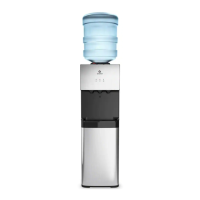
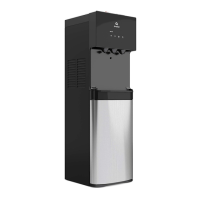
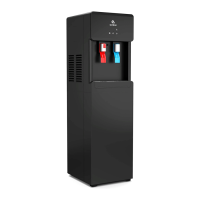
Attractive Design

Highlights the product's aesthetic appeal and press-paddle spout design.

Custom Temperature

Features piping hot or crisp cold water options for user convenience.

Top Loading Design

Designed for easy loading of standard 3 or 5 gallon water bottles.

UL Listed Safety

Indicates compliance with safety standards, emphasizing design and manufacturing with safety in mind.

Child Safety Feature

Ensures safe delivery of hot water, preventing accidental burns for the entire family.

Indicator Lights

Power Indicator Light

Remains on when the water cooler is plugged in, indicating it is powered on.

Heating Indicator Light

Illuminates when water is heating, turns off when target temperature (185°F) is reached.

Cooling Indicator Light

Illuminates when water is cooling, turns off when target temperature (47°F) is reached.

Technical Specifications

Getting Started

Unpacking Your Water Cooler

Dispenser Placement

Instructions on where to place the dispenser, emphasizing a cool, shaded, and level surface near an outlet.

Operation Instructions

Bottle Setup and Initial Dispensing

Steps for removing bottle labels, inserting the bottle, and dispensing initial water to prime the system.

Dispensing Hot and Cold Water

Instructions on pressing paddles, using the child safety lock, and activating heating/cooling switches.

Indicator Lights and Bottle Replacement

Explains indicator light behavior and the process for replacing the water bottle.

Cleaning

Rinsing, Cleaning, and Draining

Preparation and Initial Rinse

Ensure switches are off, unplug, pour water, and dispense to begin the rinsing process.

Draining Water

Place a bucket to drain water from the rear outlet and prepare for the main draining step.

Main Draining and Hot Water Caution

Drain water from the rear outlet. Caution about potential burns from hot water.

Final Rinse and Reassembly

Remove remaining water, flush with water, and replace the drain cover to resume normal use.

Deep Cleaning Procedure

Prepare Cleaning Solution

Mix 4L water with 200g citric acid crystals or chosen solution to remove mineral deposits.

Apply Cleaning Solution

Twist off bottle supporter and put the mixture into the cold tank, ensuring it flows to the hot spout.

Heating and Cooling Cycle

Plug in, turn on heating switch for 15 min, then turn off and let cool for 20 min.

Final Deep Clean Flush

Drain the liquid, flush with water, and reassemble parts carefully to avoid damage.

Troubleshooting

Contact and Solutions

Offers solutions for common issues and provides contact details for further assistance.

Dispensing Problems

Addresses issues like no water dispensing, empty tanks, or water not reaching desired temperatures.

Water Leaks

Solutions for leaks from the bottle supporter, including checking for broken bottles or seals.

Operational Noise

Guidance on resolving noisy operation by ensuring proper placement on a level surface.

Safety

General Safety Precautions

Covers important safety guidelines for operating the dispenser, including usage and placement.

Electrical Safety

Instructions on grounding outlets, avoiding extension cords, and safe unplugging practices.

Child Safety and Usage

Guidelines for supervision of children, appliance use by persons with disabilities, and intended environments.

Maintenance and Operation Safety

Covers safety during cleaning, refrigerant circuit warnings, and operational restart procedures.

Warranty

Warranty Coverage and Limitations

Details the one-year limited warranty, exclusions, and conditions for claims.

Warranty Claim Process

Explains how to submit a claim, the need for troubleshooting, and purchaser responsibilities.

Legal and Provincial Rights

Discusses state/provincial rights regarding implied warranties and limitations.

Summary

Were Here to Help

Contact Information

Provides phone, email, and live chat details for customer support and inquiries.

Lets Connect

Social Media and Website

Links to social media accounts and the official company website for news and updates.

Use and Care Guide

Product Models

Identifies the specific models covered by this guide: A1TL and A2TL.

Warranty Registration

Register Your Cooler Online

Instructions to register the water cooler within 30 days of purchase to activate the warranty.

Support Information

Keep purchase details for support. Contact number for assistance is 1-800-256-0695.

Meet Your Avalon Product

Attractive Design

Highlights the product's aesthetic appeal and press-paddle spout design.

Custom Temperature

Features piping hot or crisp cold water options for user convenience.

Top Loading Design

Designed for easy loading of standard 3 or 5 gallon water bottles.

UL Listed Safety

Indicates compliance with safety standards, emphasizing design and manufacturing with safety in mind.

Child Safety Feature

Ensures safe delivery of hot water, preventing accidental burns for the entire family.

Indicator Lights

Power Indicator Light

Remains on when the water cooler is plugged in, indicating it is powered on.

Heating Indicator Light

Illuminates when water is heating, turns off when target temperature (185°F) is reached.

Cooling Indicator Light

Illuminates when water is cooling, turns off when target temperature (47°F) is reached.

Technical Specifications

Getting Started

Unpacking Your Water Cooler

Dispenser Placement

Instructions on where to place the dispenser, emphasizing a cool, shaded, and level surface near an outlet.

Operation Instructions

Bottle Setup and Initial Dispensing

Steps for removing bottle labels, inserting the bottle, and dispensing initial water to prime the system.

Dispensing Hot and Cold Water

Instructions on pressing paddles, using the child safety lock, and activating heating/cooling switches.

Indicator Lights and Bottle Replacement

Explains indicator light behavior and the process for replacing the water bottle.

Cleaning

Rinsing, Cleaning, and Draining

Preparation and Initial Rinse

Ensure switches are off, unplug, pour water, and dispense to begin the rinsing process.

Draining Water

Place a bucket to drain water from the rear outlet and prepare for the main draining step.

Main Draining and Hot Water Caution

Drain water from the rear outlet. Caution about potential burns from hot water.

Final Rinse and Reassembly

Remove remaining water, flush with water, and replace the drain cover to resume normal use.

Deep Cleaning Procedure

Prepare Cleaning Solution

Mix 4L water with 200g citric acid crystals or chosen solution to remove mineral deposits.

Apply Cleaning Solution

Twist off bottle supporter and put the mixture into the cold tank, ensuring it flows to the hot spout.

Heating and Cooling Cycle

Plug in, turn on heating switch for 15 min, then turn off and let cool for 20 min.

Final Deep Clean Flush

Drain the liquid, flush with water, and reassemble parts carefully to avoid damage.

Troubleshooting

Contact and Solutions

Offers solutions for common issues and provides contact details for further assistance.

Dispensing Problems

Addresses issues like no water dispensing, empty tanks, or water not reaching desired temperatures.

Water Leaks

Solutions for leaks from the bottle supporter, including checking for broken bottles or seals.

Operational Noise

Guidance on resolving noisy operation by ensuring proper placement on a level surface.

Safety

General Safety Precautions

Covers important safety guidelines for operating the dispenser, including usage and placement.

Electrical Safety

Instructions on grounding outlets, avoiding extension cords, and safe unplugging practices.

Child Safety and Usage

Guidelines for supervision of children, appliance use by persons with disabilities, and intended environments.

Maintenance and Operation Safety

Covers safety during cleaning, refrigerant circuit warnings, and operational restart procedures.

Warranty

Warranty Coverage and Limitations

Details the one-year limited warranty, exclusions, and conditions for claims.

Warranty Claim Process

Explains how to submit a claim, the need for troubleshooting, and purchaser responsibilities.

Legal and Provincial Rights

Discusses state/provincial rights regarding implied warranties and limitations.

Avalon A1TL Specifications

General IconGeneral
Hot/Cold Temp Output1.2L/min / 1.2L/min
Hot Water Capacity4 L/H ( ≥ 185°F)
Hot Tank Volume1.02 Liters
Cold Water Capacity2 L/H ( ≤ 47°F)
Cold Tank Volume3 Liters
Cooling MethodCompressor
Heating MethodInternal Element
Voltage/Frequency115 V 60Hz
Heating Watts / Cooling Watts420W / 100 W
Power Consumption520 W
Weight and Dimensions IconWeight and Dimensions
Product Size11.25”(L)x10.75”(W)x42”(H)
Packing Size15.5”(L)x14.3”(W)x46.5”(H)
Net Weight/Gross Weight30.65 lb /34.8 lb

Related product manuals