Monday, 2 December 2013 PH658N - User Manual v1.1 12/15
F. Firmware Upgrade and User Configuration Backup / Restore
The firmware of the phone can be provisioned remotely.
Administrators can do so easily on the Web Portal.
Browsers that support this function include Internet Explorer and Mozilla Firefox.
1. Go to the "Admin" page
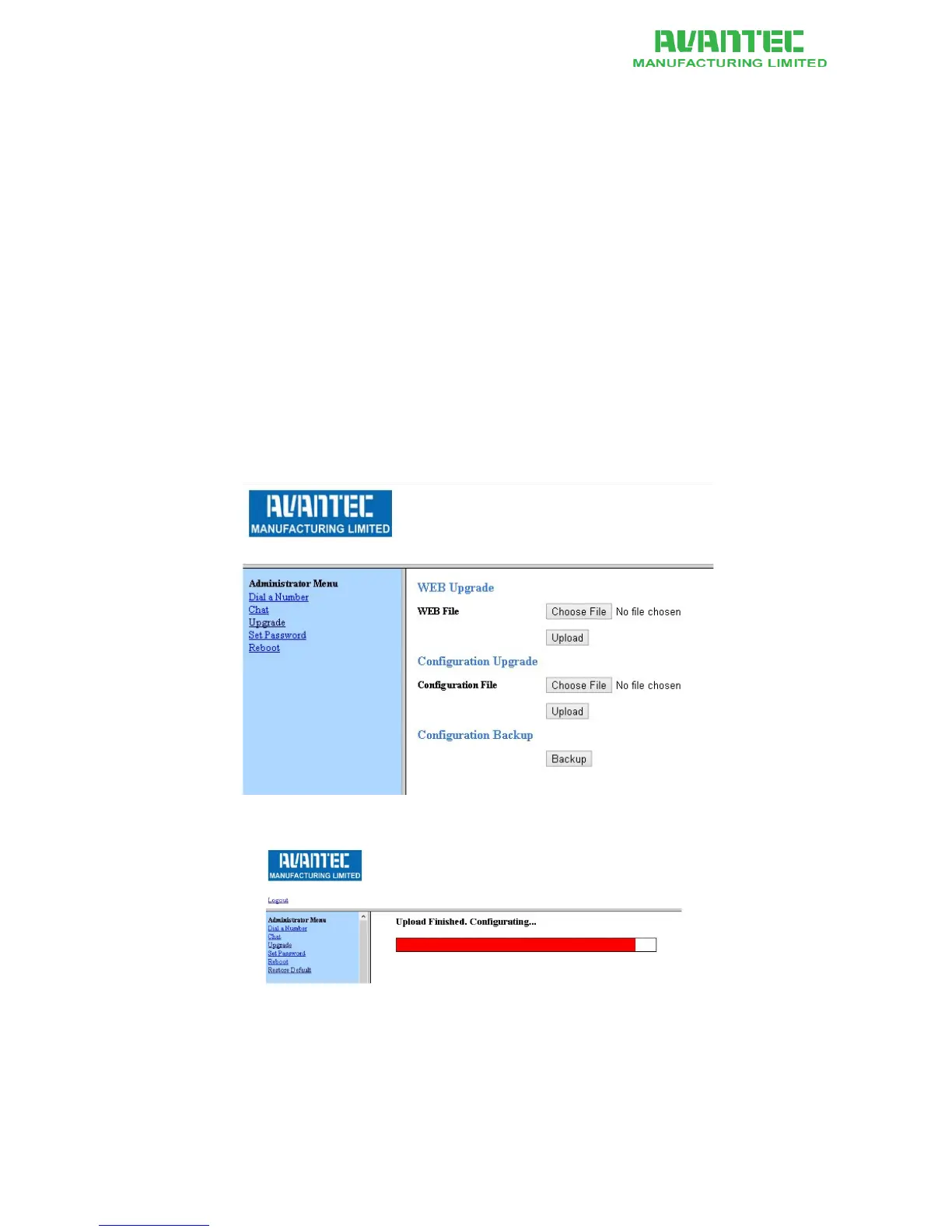
2. On the left panel, click on "Upgrade" link. See Figure 10
3. Click on "Choose File" button and browse for vmlinuz
4. Click Upload
5. A progress bar appears. See Figure 11. There may be some seconds when it
temporarily disappears. Important: Do not unplug the power or Ethernet
connection
6. The whole progress takes approximately 55 seconds.
7. When complete, the browse brings you to a new page and shows a confirmation. See
Figure 12.
8. The phone power-cycles itself and comes back to run in the new firmware
If the upgrade fails, disconnect the base from the Ethernet and re-connect it in order to trigger a
power-cycle. Redo the firmware upgrade procedure.
Figure 10 - Firmware upgrade, User Configuration Backup / Restore on Web Portal
Figure 11 - Firmware upgrade progress bar. Do not disconnect power or Ethernet cable



 To Next Page