www.avantgarde-acoustic.de page 9
Version 1.4 – May 25, 2007
SOLO
OPERATING INSTRUCTIONS
REM
GND
HIGH EQ
LOW EQ
HIGHPASS
VOLUME
INPUT
OFF
20
120
ON
OFF
ON
0 +3 −2
6
7
9
8
5
4
3
2
1
FUSE
OPERATION
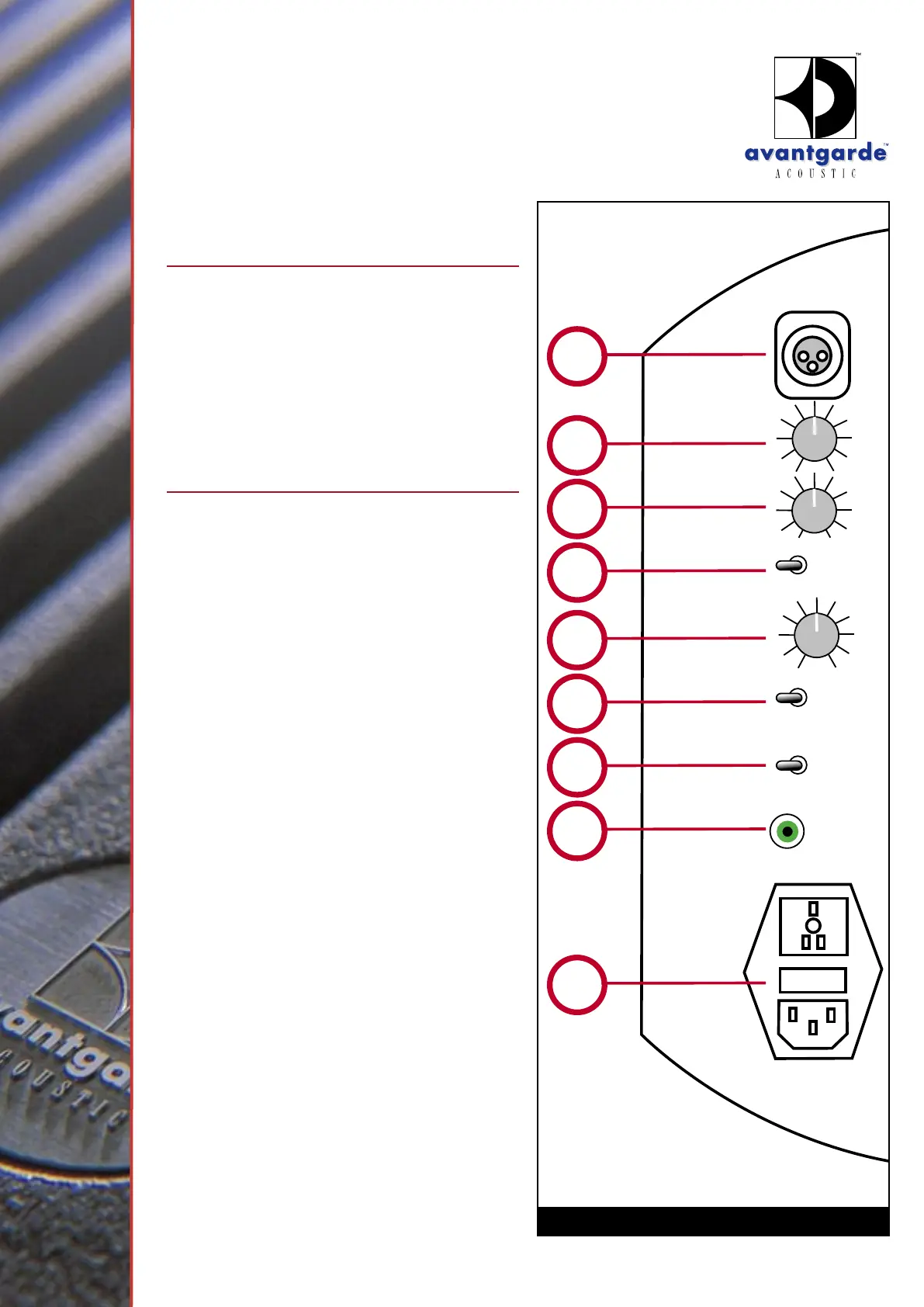
GRAPHIC 7
GENERAL
Note, that Avantgarde Acoustic
horn systems are
extremely sensitive compared to “conventional”
speaker systems and consequently not only music
but also hum noises caused by low signal-to-
noise ratios of the used electronic components
(ex. amplifiers) are reproduced louder and might
become audible. Contact your dealer and have
your audio electronics checked.
VOLUME CONTROL
(See graphic 7)
The volume of the speaker and its input sensitivity
can be controlled within a wide range. This way it
is easily possible to adjust the speaker to different
signal strength of preamplifiers, surround processors
, mixing consoles and power amplifiers. Adjust the
output level using the VOLUME attenuator
of
the speaker power amplifier module. A clockwise
rotation will increase the level, a counter-clockwise
rotation will decrease the level.
To determine the most practical setting of the
VOLUME
:
1. Counter-clockwise rotate the VOLUME control
of the SOLO to the 0-position.
2. Turn your amplifier and the speakers
ON.
3. Turn the VOLUME control of your AMPLIFIER
up to a middle position. E.g. a setting which
normally gives you a medium sound pressure
level (with your old speakers).
4. Turn the VOLUME
of the SOLO up till you
hear the expected medium sound pressure
level.
The same procedure is applicable for surround
processors , mixing consoles and preamplifiers.
Please see as well the chapter on the factory
settings for all SOLO controls.


 To Next Page