User Manual DUET
8
EN
Connecting to Your TV
Once the transmitter is connected to power source, you can then
connect it to TV’s audio output ports. You can choose one of 3
dierent ways to do this:
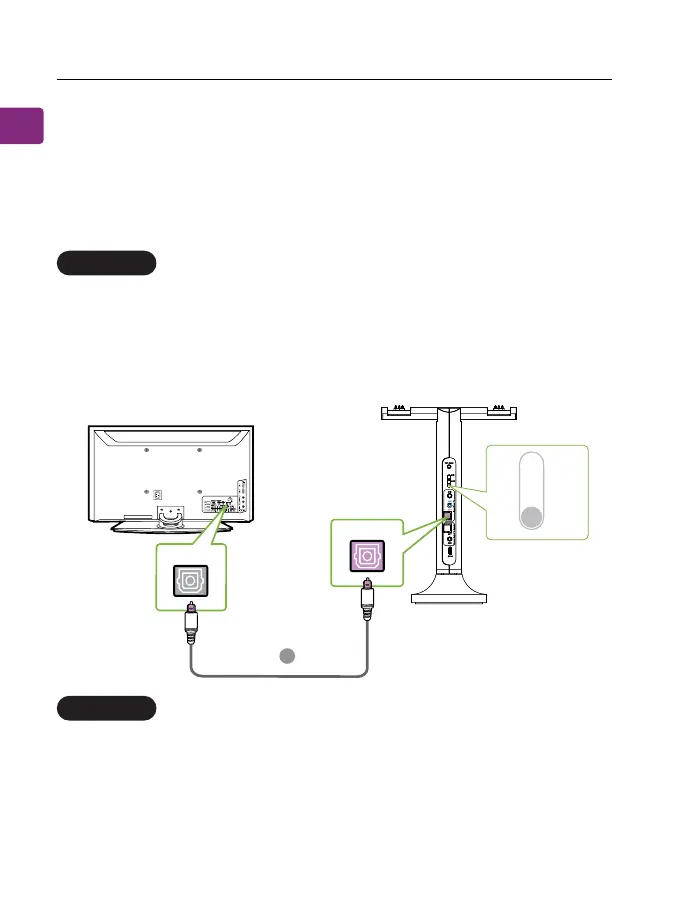
Optical port (recommended)
AUX 3.5mm port
plug the provided optical audio cable (Figure E) into the TV’s
optical OUT or “OPT / OUT” port, then plug the other end into the
transmitter’s optical port in the “INPUT FROM TV” section.
Switch the Audio Input Selector on the transmitter to OPT position.
plug the provided AUX 3.5mm audio cable (Figure F) into the TV’s
AUX 3.5mm output port, then plug the other end into the transmit-
ter’s AUX 3.5mm input port in the “INPUT FROM TV” section.
Switch the Audio Input Selector on the transmitter to AUX position.
OPTION 1
OPTION 2
E
OPT
Input From TV
OPT/OUT
TV
MI
OPT


 To Next Page