1
Overview
AUDIO IN
SELECT
POWER
ATT.
AUDIO IN
OPTICAL
COAXIAL
R
L
RCA
550mA
DC IN 5V
0 dB
-8 dB
TV
AVR
COAX.
OPT.
RCA
OFF
ON
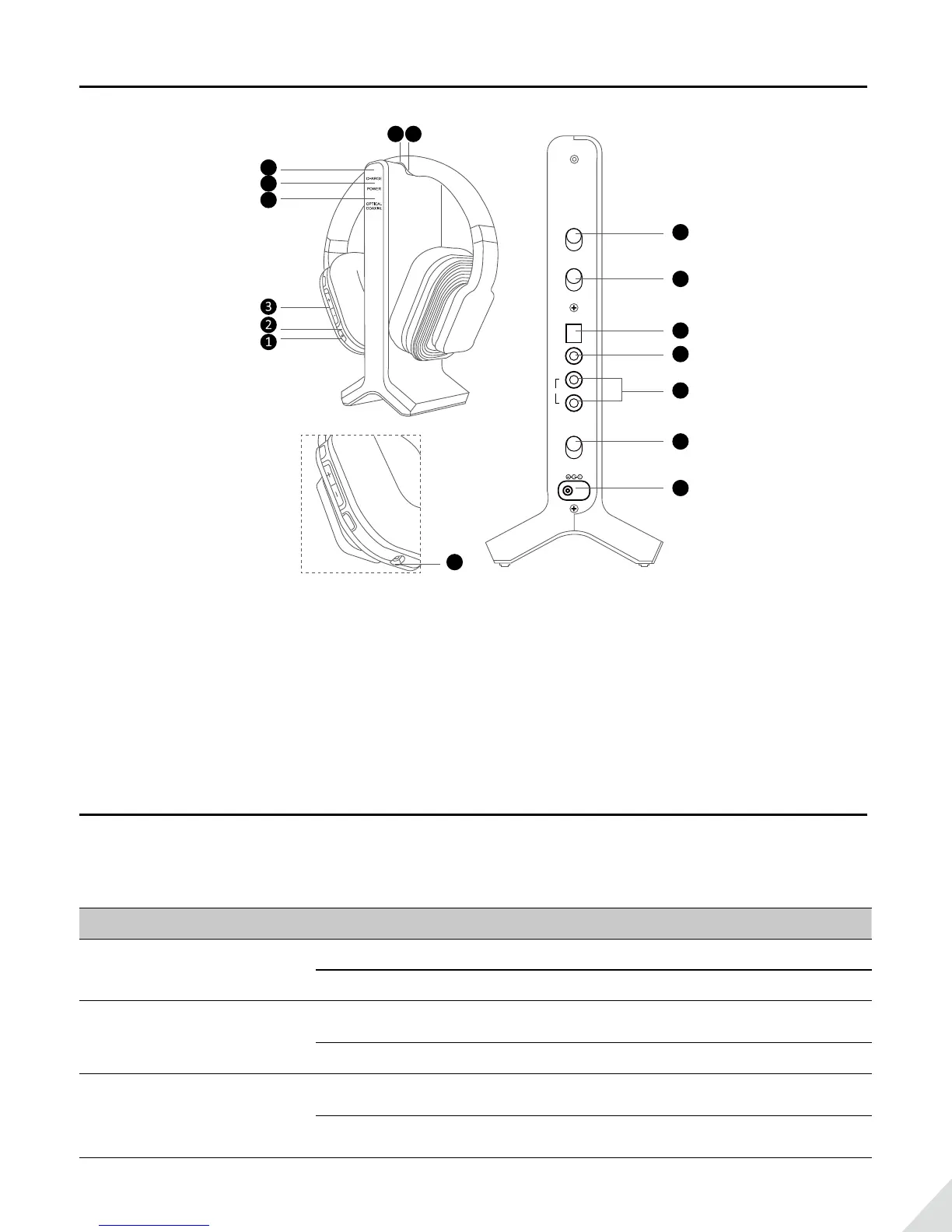
1. Power ON/OFF
2. Power Indicator
3. Volume Control
4. Optical/Coaxial Indicator
5. Power Indicator
6. Charge Indicator
7. Contact Pins
8. Contact Points
9. Audio In Select Switch
10. Attenuation (ATT.) Switch
11. Optical Audio Input
12. Coaxial Audio Input
13. RCA Audio Input
14. Power ON/OFF Switch
15. DC IN
16. AUX/3.5MM Headphone Jack
16
15
14
13
12
11
10
9
4
5
6
LED indicators
LED indication of the transmitter/charging dock
LED indicator Work status LEDs status
CHARGE
Recharge headphone SOLID YELLOW-GREEN
Recharge of headphone complete Turn o
POWER
Power on
Flashes BLUE for 4-5 seconds,
then stay SOLID BLUE
Power o Turn o
OPTICAL /
COAXIAL
Use optical or coaxial input and
audio signal is detected
Stay SOLID RED
Use optical or coaxial input but NO
audio signal is detected after 5 minutes
Flashes RED



 To Next Page