4
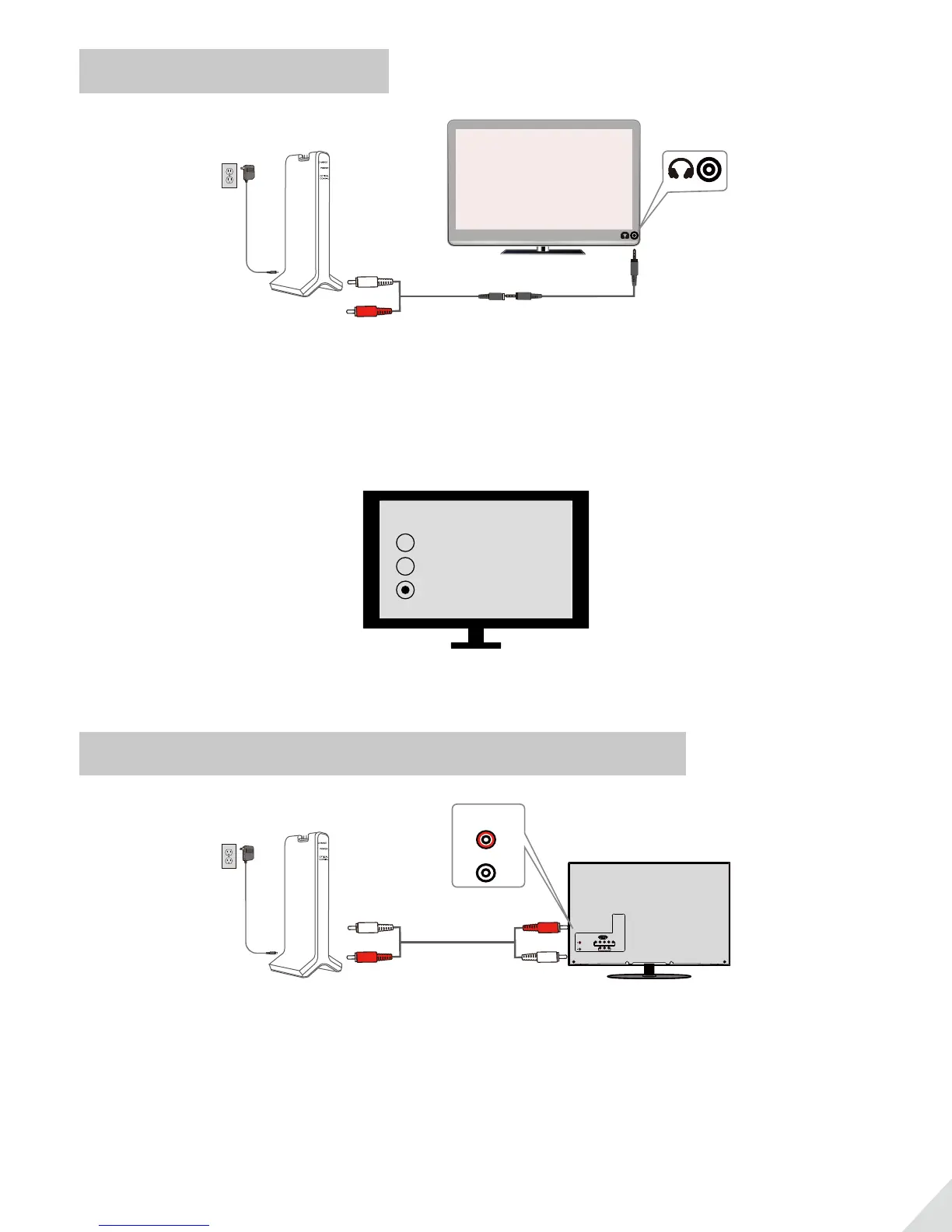
TVs with AUX 3.5mm Audio Out
3.5mm to RCA
AUX/3.5 mm
After turning on HT280 and connecting cables, you should be able to hear sound from your headphones; if not,
a. Ensure the Audio In Select Switch on transmitter is set to “RCA” position.
b. Ensure your TV speaker is set to “Headset”.
Speakers
Internal speakers
External speakers
Headset
Note: Setting menu may be dierent depending on dierent TV brands and model.
TVs with RCA audio out(Red/White ports labeled “AUDIO OUT”)
AUDIO OUT
RCA audio cable
R
L
AUDIO OUT
After turning on HT280 and connecting cables, you should be able to hear sound from your headphones; if not,
· Ensure the Audio In Select Switch on transmitter is set to “RCA” position.
· Ensure use TV Red/White ports labeled “AUDIO OUT”, other Red/White ports are incorrect
(This is IMPORTANT).
· Ensure your TV Speaker is set to “External Speaker”.



 To Next Page