2
LED indication of the headphone
Work status LED status
Power on LED close to stay SOLID RED for 1-2 seconds
Connected LED close to turn SOLID YELLOW-GREEN
Turn on HT280
Power up the transmitter/charging dock
Connect the transmitter/charging dock to a compatible power source using AC adapter.
Slide ON/OFF switch to “ON” position, POWER LED indicator lights up BLUE.
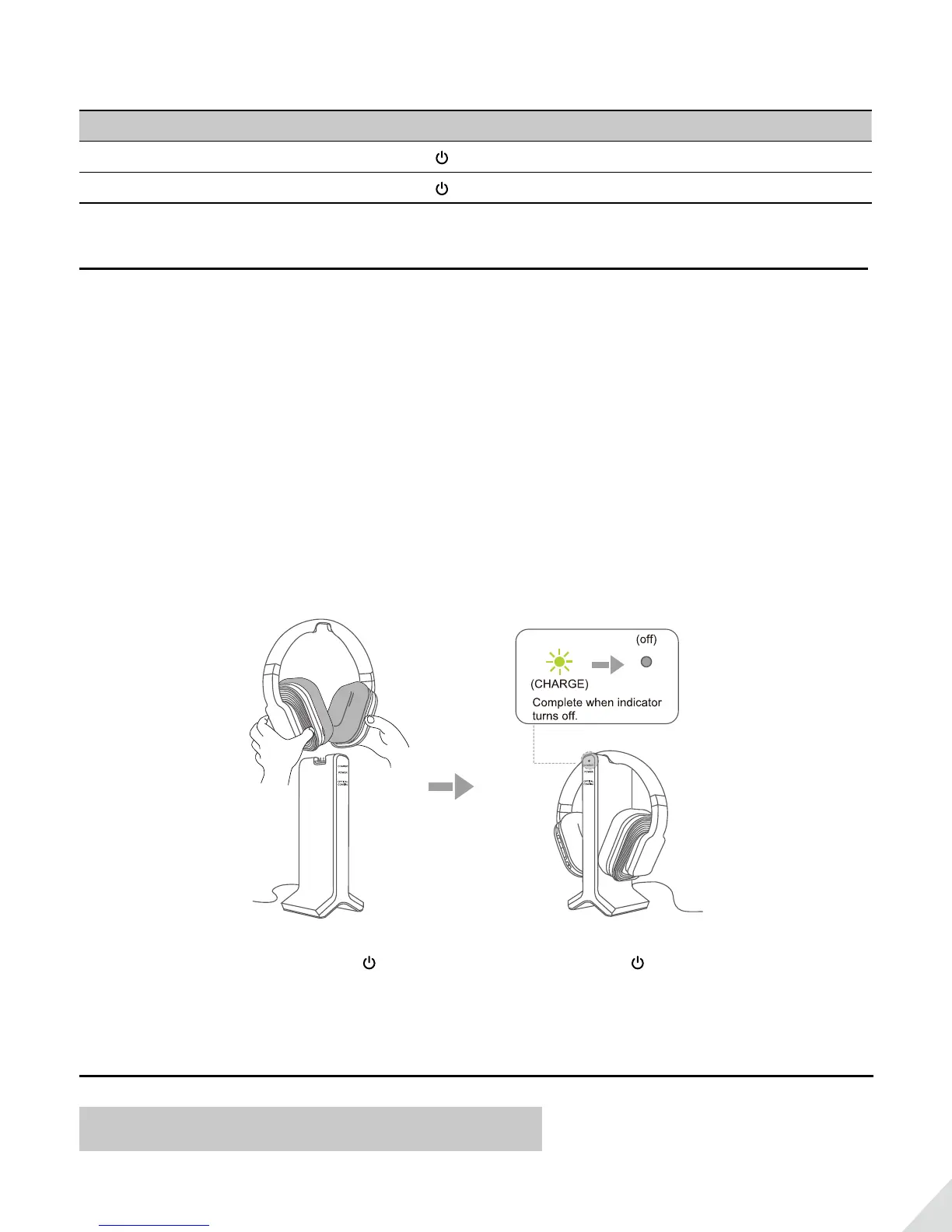
Charge and turn on the headphone
Charge headphone for 6 hours prior to the initial use:
Place the headphone on transmitter/charging dock, the charging begins automatically, the CHARGE LED on the
transmitter/charging dock lights up YELLOW-GREEN.
When the charging is complete, the CHARGE LED on the transmitter/charging dock will turn o.
YELLOW-GREEN
Turn on the headphone: Press and hold for 1 second, LED indicator close to stay SOLID RED for 1-2 seconds,
then the headphone will auto connect to the transmitter, LED indicator turn SOLID YELLOW-GREEN.
Use HT280 with your TV
Check your TVs output options before the set up



 To Next Page