⑰
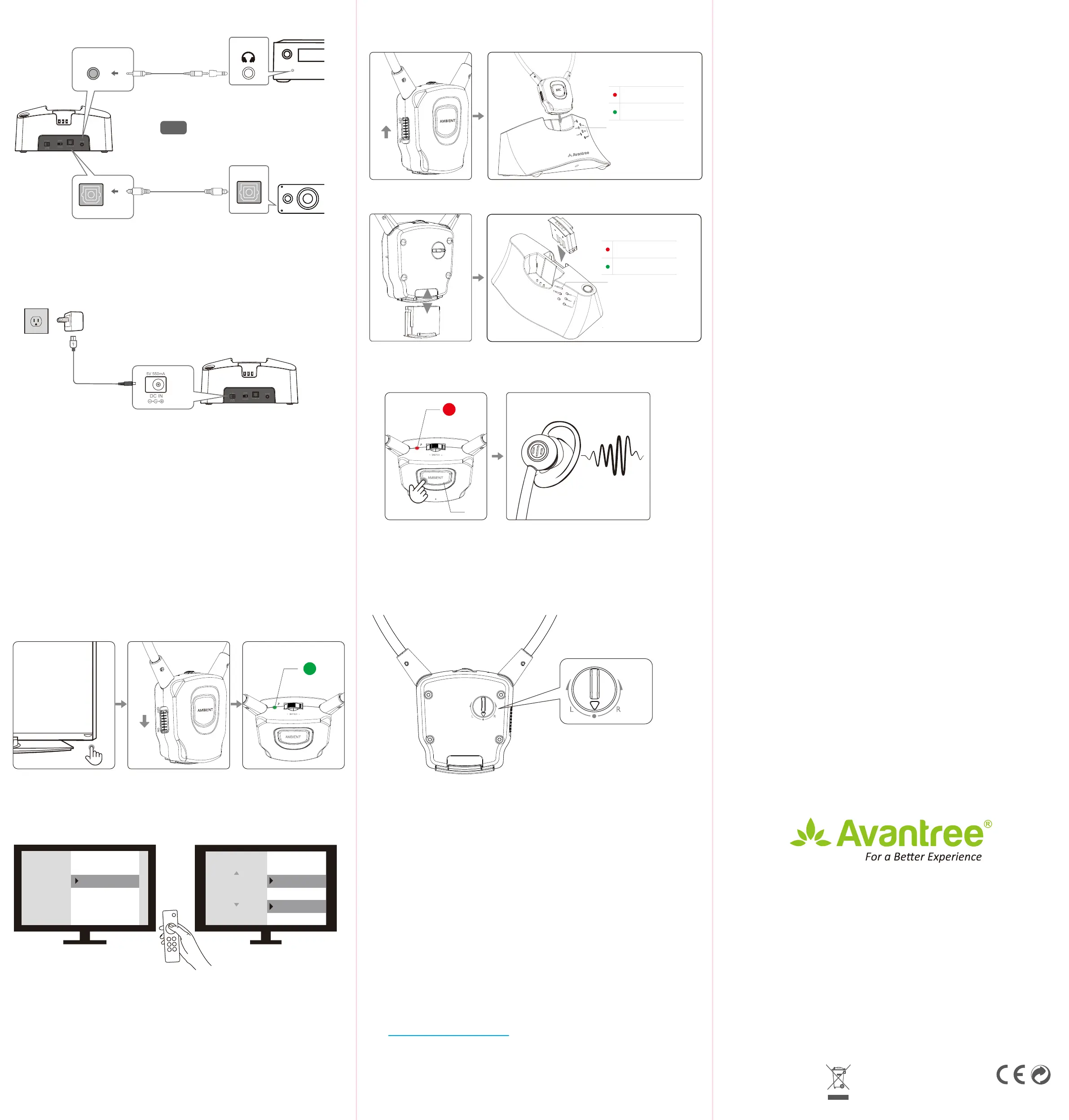
OPTION 5: If You Have a Soundbar or AV Receiver
⑪
AUX IN
DIGITAL OUT
ⒻⒹ
Ⓒ
OR
⑩
OPTICAL IN
Phone
5V/500mA - 2A
④
Charging
Ambient Function
L/R Volume Control
Part 2 – Follow instructions below to power everything on.
OPTION 1
OPTION 2
Ⓗ
⑧
VOLUME
+-
GREEN - Connected to base
RED - AMBIENT mode ON
⑭
VOLUME
+-
GREEN - Connected to base
RED - AMBIENT mode ON
⑭
⑬
Charging
Charging Complete
Step 2 Connecting the Earphone to the Transmitter Dock
Part 1. Connect the transmitter dock to a power source. We recommend
connecting it to a wall outlet using a USB wall adapter (not included).
DE: Teil 1: Schließen Sie das Senderdock an eine Stromquelle an. Wir empfehlen, es mit
einem USB-Wandadapter (nicht im Lieferumfang enthalten) an eine Steckdose
anzuschließen.
*
FR: Partie 1: Connectez la station d'accueil de l'émetteur à une source d'alimentation.
Nous vous recommandons de le connecter à une prise murale à l'aide d'un adapta-
teur mural USB (non inclus).
*
IT: Parte 1: Collegare il dock del trasmettitore a una fonte di alimentazione. Si consiglia
di collegarlo a una presa a muro utilizzando un adattatore da parete USB (non
incluso).
*
ES: Parte 1: Conecte la base del transmisor a una fuente de alimentación. Recomenda-
mos conectarlo a una toma de corriente mediante un adaptador de pared USB (no
incluido).
*
Part 3 – TV Setting
DE: Verwenden Sie Ihre TV-Fernbedienung, um in Ihr TV-EINSTELLUNGSMENÜ zu
gelangen. Stellen Sie das TV-Audioformat auf PCM / Stereo ein. Wählen Sie NICHT
AUTO, DOLBY oder BITSTREAM!
FR: Utilisez la télécommande de votre téléviseur pour accéder au MENU RÉGLAGES TV,
réglez le format audio TV sur PCM / Stéréo. Ne sélectionnez PAS AUTO, DOLBY ou
BITSTREAM!
IT: Usa il telecomando della TV per accedere al MENU IMPOSTAZIONI TV, Imposta
formato audio TV su PCM / Stereo. NON selezionare AUTO, DOLBY o BITSTREAM!
ES: Use el control remoto de su televisor para ir al MENÚ DE CONFIGURACIÓN DE TV,
congure el Formato de audio del televisor en PCM / Estéreo. ¡NO seleccione AUTO,
DOLBY o BITSTREAM!
Audio Out
Sound
Optical Out
Digital
Audio Format
PCM / Stereo
or
Dolby - Off
Use your TV remote to go into your TV's SETTINGS MENU, Set TV Audio Format to
PCM/Stereo. Do NOT select AUTO, DOLBY, or BITSTREAM !
⑤
Charging
Charging Complete
Earphone fail to reconnect to the transmitter dock?
No sound/not working?
……
For problems connecting or other troubleshooting tips go to the URL
below.
DE: Informationen zu Verbindungsproblemen oder anderen Tipps zur
Fehlerbehebung nden Sie unter der folgenden URL
FR: Pour les problèmes de connexion ou d'autres conseils de dépan-
nage, accédez à l'URL ci-dessous
IT: Per problemi di connessione o altri suggerimenti per la risoluzione
dei problemi, vai all'URL di seguito
ES: Para problemas de conexión u otros consejos para la resolución de
problemas, vaya a la siguiente URL.
support.avantree.com
Z-PKQG-HT381-V0
Dispose of the packaging and
this product in accordance with
the latest provisions.


 To Previous Page