5
Now you can stream audio from your TV.
Note:
If you don’t know how to change the settings on your TV, or if you cannot hear anything through the head-
phone after changing the settings, please contact your TV manufacturer for support. Unplug any device
from the 3.5mm AUX jack while using the OPTICAL out.(If anything is plugged into the AUX jack, the trans-
mitter will default to the AUX signal and ignore any OPTICAL input).
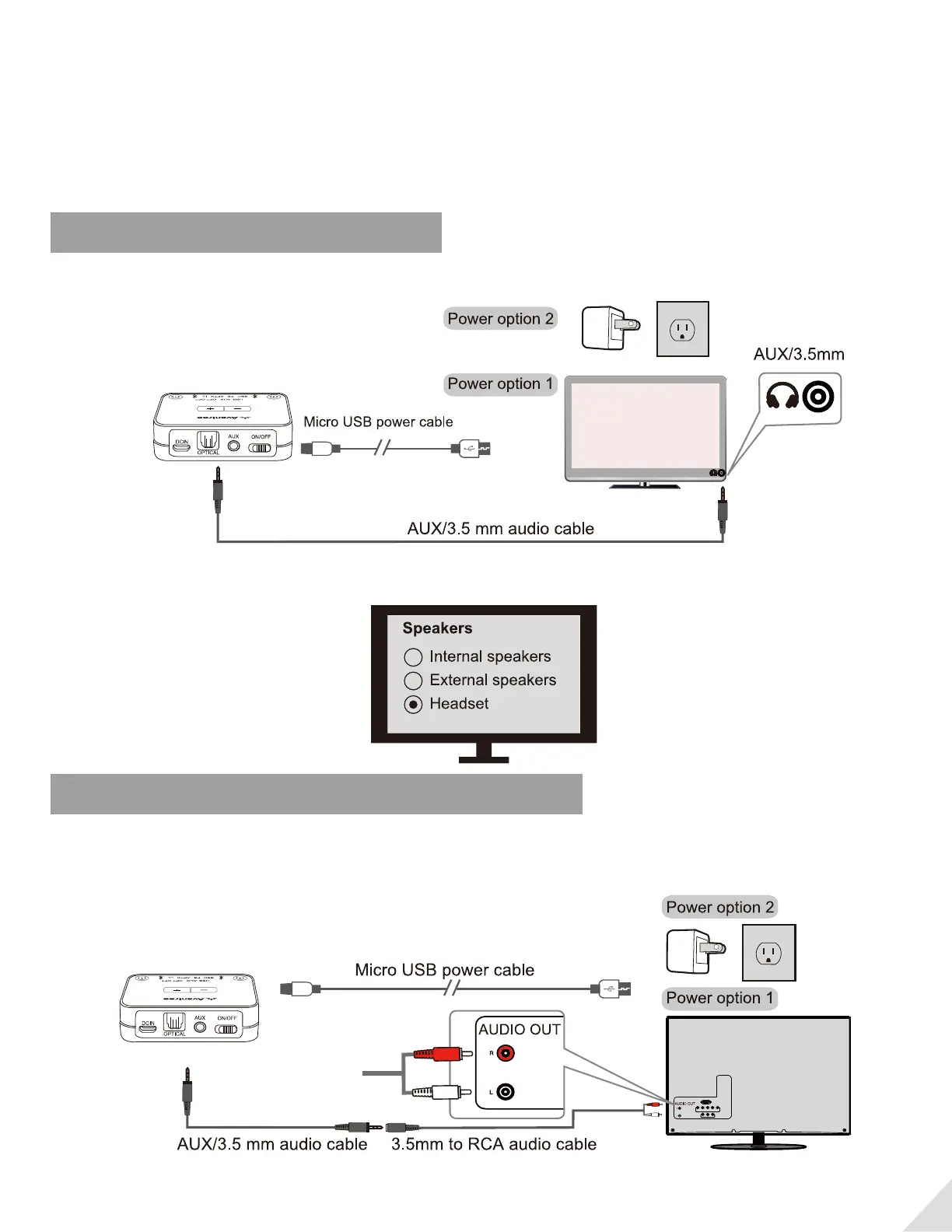
If your TV has Headphone (3.5mm) Out
Please use the AUX cable to connect the transmitter and TV. Now you can stream audio from your TV.
Note: If there is no sound playing from headphone, please set the Sound Out / Speaker setting on your TV
to “Wired headphones” or “Headset”.
If your TV has Red/White Audio Out (RCA- only for TV)
Please use AUX cable&3.5mm to RCA Audio adapter (both provided in the package) to connect the trans-
mitter and TV. Now you can stream audio from your TV.


 To Next Page