SJC Telephone System Upgrade to VoIP
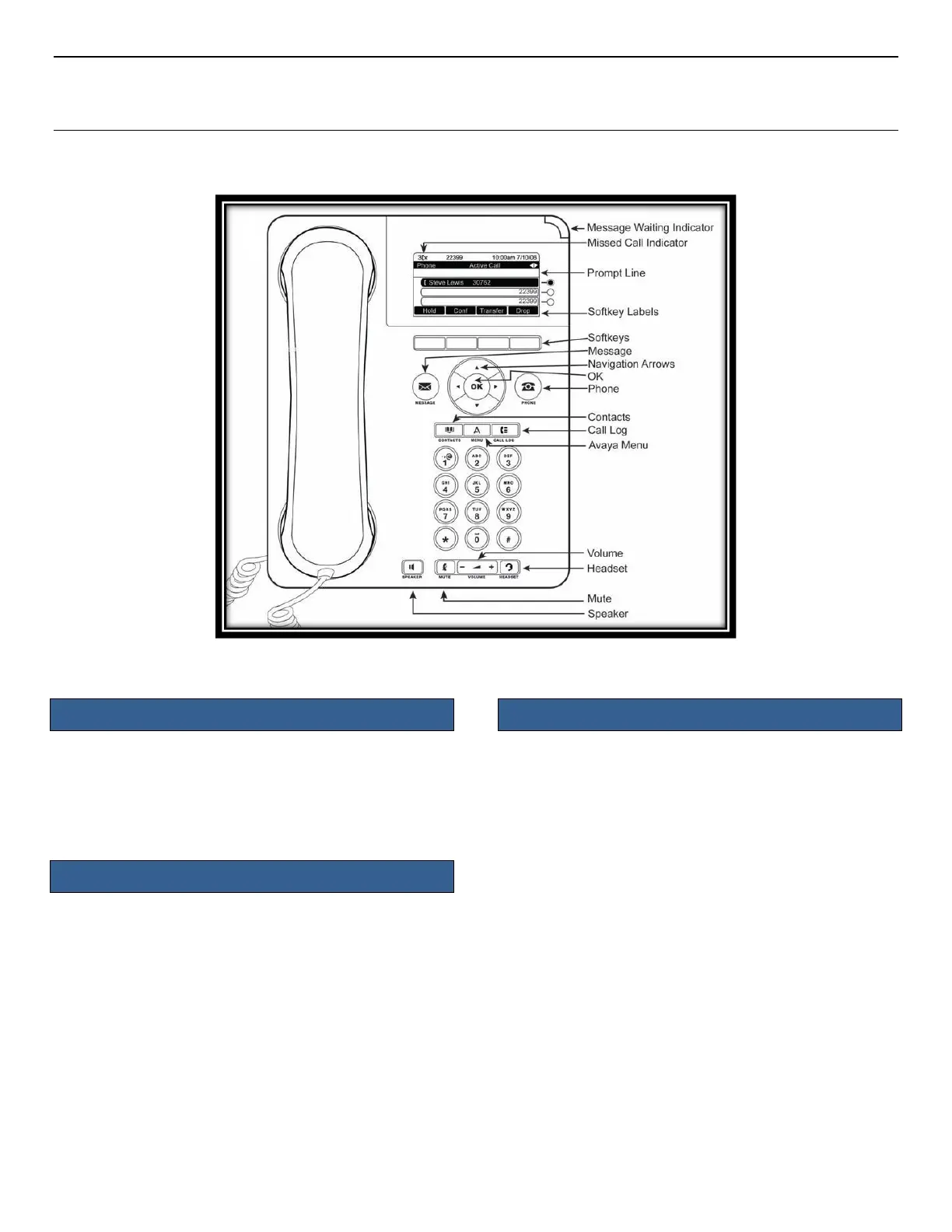
Avaya Phone Model 9620L
QUICK START GUIDE
Accessing the Features Menu
1. Press the right arrow key to access Features
2. Use the Up/Down arrow keys to scroll through
available features
3. Press the Phone button to return to the main
screen
1. Use the Up/Down arrow keys to select the number
you wish to transfer
2. Select the Transfer softkey
3. Dial the telephone number
4. Press the Complete softkey
Send All Calls to Voicemail:
1. Press the right arrow key to access Features
2. Use the Up/Down arrow keys to scroll to
SendAllCalls
3. Press the OK button to turn this feature on or off
Manually Forwarding to an Alternate Number:
1. Press the right arrow key to access Features
2. Select the forwarding feature you want to activate
3. Press the OK button
4. When prompted enter the number to which you
want to forward calls
5. Press the OK button











 To Previous Page