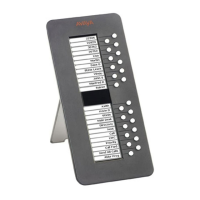
About The EU24/EU24BL Expansion Module
12 EU24/EU24BL Expansion Module Release 2 User Guide
Understanding Call Appearance/Feature Button Status
Icons
When a call arrives for a call appearance on the EU24/EU24BL Expansion Module, the bell icon
blinks on the corresponding call appearance. To answer the call, press the button associated
with the call appearance.
The icons displayed on the call appearance allow you to determine the status, for example, on
Hold, of each call on the EU24/EU24BL Expansion Module. Table 1
contains an explanation of
these icons.
Table 1: EU24/EU24BL Status Icons
Icon Condition Definition
None Idle The call appearance line is available, or the feature is off.
Ringing An incoming call is waiting to be answered.
Active The call you are currently handling.
On hold A call currently on hold.
On soft hold A call put on hold during a transfer or conference.
Feature/Line active Button on left side of the display currently is enabled.
Feature/Line active Button on right side of the display currently is enabled.
Feature pending Your request is being processed but is not immediately
available.
Feature status The Call Center Q Time feature uses this icon.
Feature status The Call Center Aux Work feature uses this icon.
Feature status The Call Center Service Observing feature uses this icon.



 To Previous Page
 Loading...