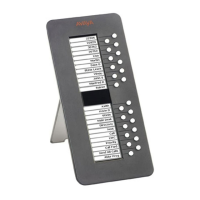
Requirements
Issue 2 April 2005 9
Requirements
Before you can use the EU24/EU24BL Expansion Module, you must connect the module to the
telephone. See the EU24/EU24BL Expansion Module Installation and Safety Instructions
(555-233-136) for instructions.
Using the EU24/EU24BL Expansion Module
The following sections explain how to use the features of the EU24/EU24BL Expansion Module.
For more information, consult your system administrator.
Adjusting the Viewing Angle
You can adjust the expansion module’s viewing angle to match that of the phone to which it is
attached.
To Adjust the Expansion Module Upward
1. Hold the EU24/EU24BL base with one hand.
2. Grasp the top of the module and pull up until the module’s height equals that of the
telephone.
3. Ensure that the movable section on the underside of the module clicks into the appropriate
height adjustment notch on the expansion module’s base.
To Adjust the Expansion Module Downward
1. Hold the EU24/EU24BL base with one hand.
2. Depress the button on the top edge of the module and gently push the expansion module
down until the module’s height equals that of the telephone.
3. Ensure that the movable section on the underside of the module clicks into the appropriate
height adjustment notch on the expansion module’s base.



 To Next Page