6
Back Panel
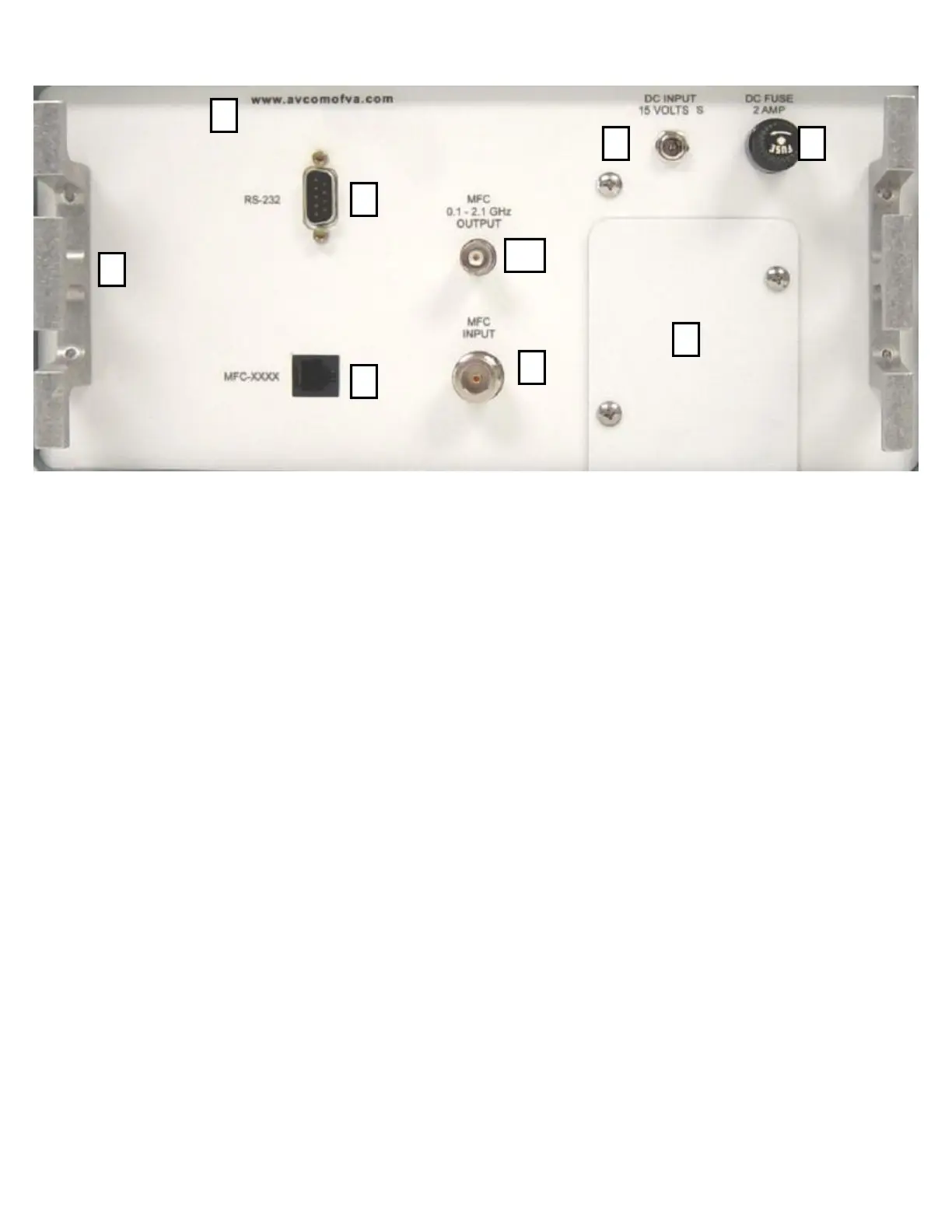
P. METAL Foot
This metal foot can be used to stand the unit on a firm surface with the LCD Display facing up to-
ward the technician. It is also used as a cord wrap for the AC/DC power cables.
Q. RS-232
The RS-232 jack is provided for remote control of the PSA-37XP and also firmware updates. The
standard baud rate for communications is 115Kbps. See USER OPTIONS - Serial Port Options.
R. MFC-XXXX
This port is used to connect a Frequency Converter for use in higher frequency ranges. See AC-
CESSORIES
S. BATTERY PANEL
Two thumbscrews are provided for easy removal and attachment of the rear battery panel to ac-
cess the Lithium Ion batteries.
T. DC FUSE
Fuse for circuit protection. The 2Amp 250V fuse must be in place to operate while plugged in to
the AC/DC Converter, or on battery power.
U. DC INPUT JACK
15V DC Jack for power input. This unit will run on either a AC-DC Converter at 15VDC, or on a
12VDC car power adapter. Running the unit with a 12VDC source will not be sufficient to charge
the batteries. Charging of the batteries should be accomplished by plugging the PSA-37XP into
the converter at 15VDC
U
S
T
P
Q
R
V
X
W



 To Next Page