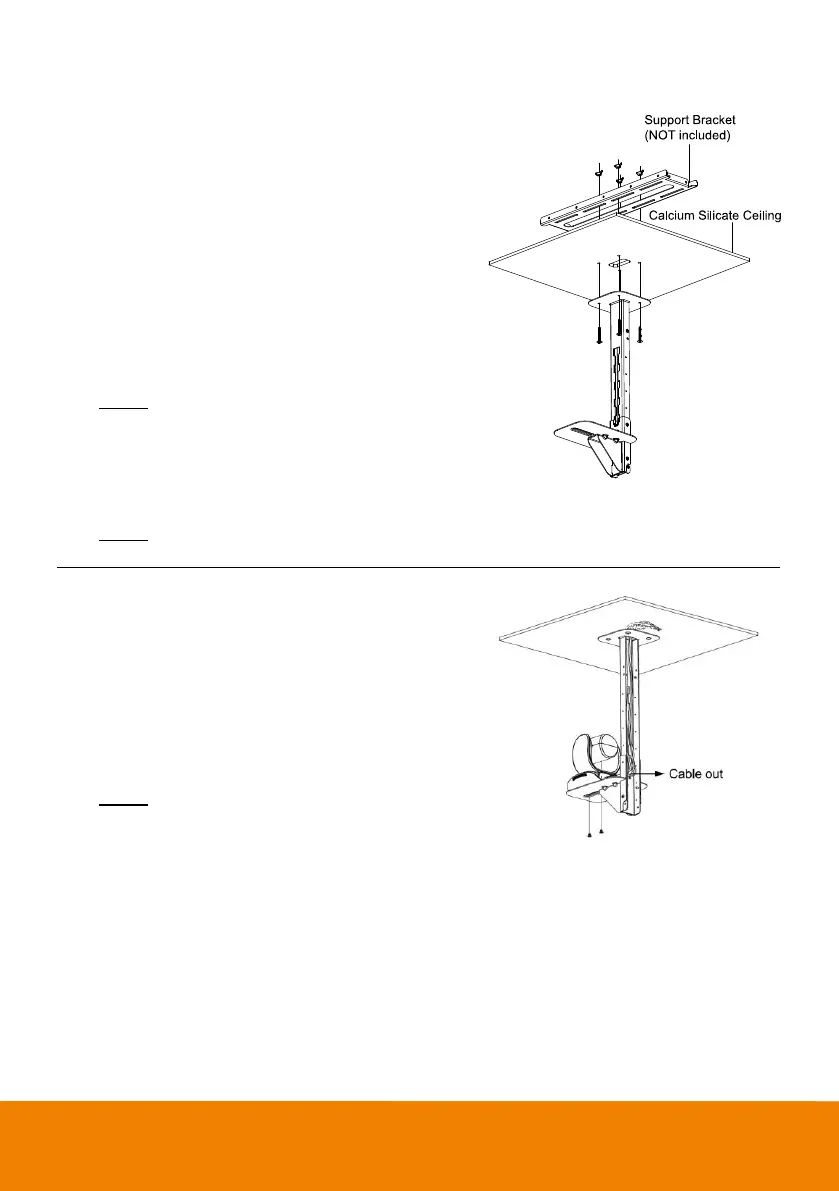
1. Please purchase support bracket for supporting
camera mount bracket on calcium silicate ceiling.
Then, secure the support bracket on the light steel
frame structure.
2. Drill the hole on the calcium silicate ceiling. Open a
hole on the calcium silicate ceiling to allow camera
cables to pass through.
3. Then, secure the mount bracket, calcium silicate
ceiling and support bracket together.
Screw: 4 Wingnut + 4 M6x50mm (Not included in
package)
4. Use the supplied screws with washers to secure the
camera bracket to the mount bracket.
Screw: 4 M8 x 4 + 4 Washer
5. Connects all cables on the camera and pass all
cables through the hole on the mount bracket.
Organize all cables to pass through the hole on the
ceiling. Also, the cable can go out from top or bottom
of mount bracket.
6. Then, secure the camera on the camera bracket.
Screw: 2 UNC-1/4"-20 (Not included in package)



 To Next Page