16
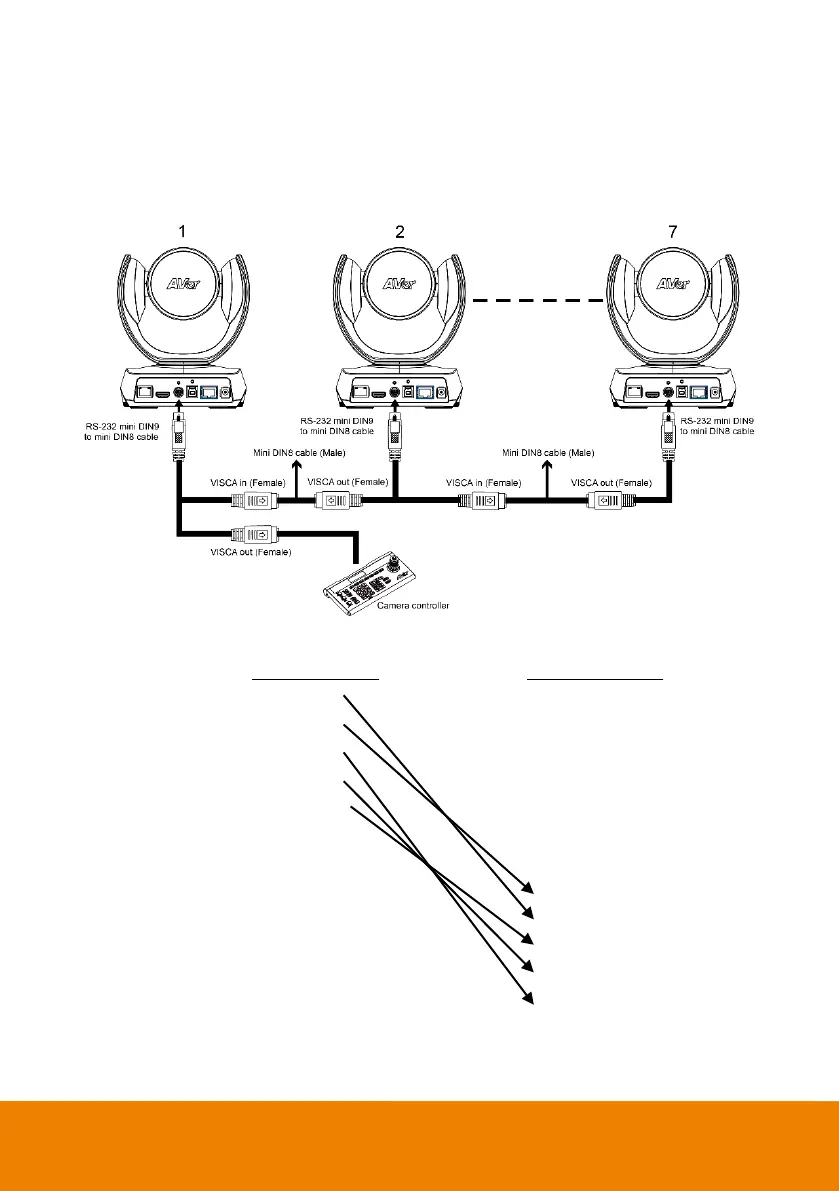
Use the RS-232 mini DIN9 to mini DIN8 cable
You can connect up to 7 cameras.
To facilitate cascade connection, you can purchase an AVer RS-232 adapter cable.
Connect camera with AVer mini DIN9 to mini DIN8 adapter cable. Connect the mini DIN8 female side
to male mini DIN8 Visca cable (Users have to buy it in the market) and then connect AVer mini DIN9 to
mini DIN8 adapter cable again to connect to next camera.
Camera 1
(Mini DIN8)
Camera 2
(Mini DIN8)
1. DTR (IN) 1. DTR (IN)
2. DSR (IN) 2. DST (IN)
3. TXD (IN) 3. TXD (IN)
4. GND (IN) 4. GND (IN)
5. RXD (IN) 5. RXD (IN)
6. GND (IN) 6. GND (IN)
1. DTR (OUT) 1. DTR (OUT)
2. DSR (OUT) 2. DST (OUT)
3. TXD (OUT) 3. TXD (OUT)
4. GND (OUT) 4. GND (OUT)
5. RXD (OUT) 5. RXD (OUT)
6. GND (OUT) 6. GND (OUT)



 To Next Page