7
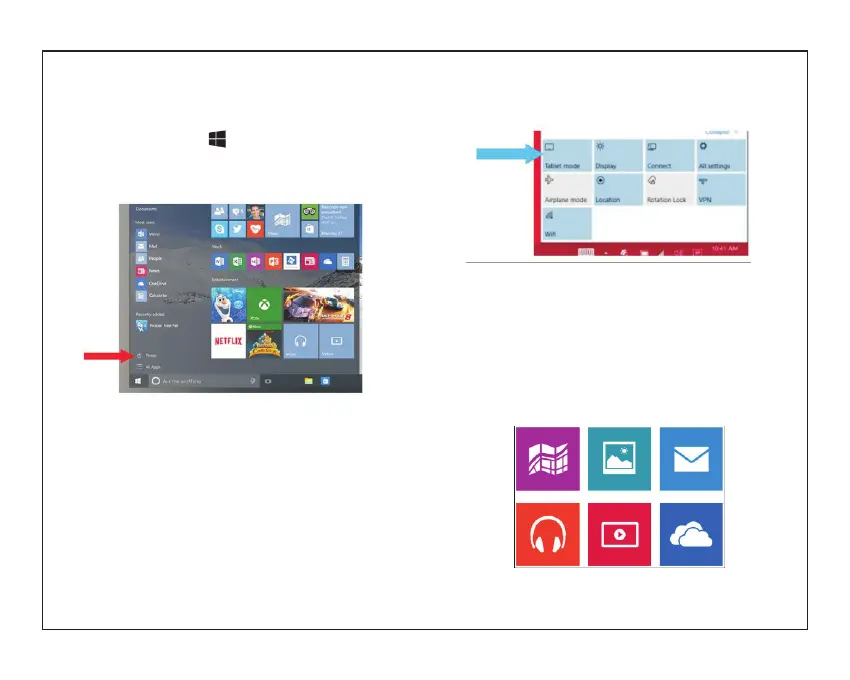
In desktop mode, tap on the bottom of the
screen to access the menu.
Tap Power→Shut down to turn off the tablet.
To turn off the tablet in tablet mode, first enable the
tablet mode by swiping
the screen from the right to access the menu. In
addition to the action center, it
also allows access to general settings like airplane
mode, rotation lock, and Wi-Fi.
Tap Table mode to enable the tablet mode. Tap
Power→Shut down to turn off
the tablet.
Built-in Applications
Windows 10 comes with built-in apps like Map,
Photos, Mail & Calendar, Music and
Video.These apps use OneDrive to back up your
information and sync seamlessly across your
Windows 10 devices, so you’re never far from
what you need.


 To Next Page